weclapp integration for ITscope
Simplified procurement and sales process thanks to a two-way integration
weclapp & ITscope simplify your daily business
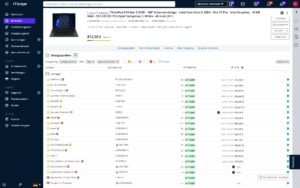
With the weclapp integration for ITscope, weclapp users are able to gain access to over 7 million IT products from more than 300 distributors listed on ITscope. These items can be used to create quotes, and can then be directly imported into weclapp. Prices, product variants and stock levels can be researched and conveniently compared.
Daily business is greatly facilitated by this: all information on items, procurement prices and suppliers is automatically made available via an import into your ERP system – eliminating the need for manual entry of items. Instead, the automation ensures a streamlined ordering process including electronic document exchange directly into weclapp.
Requirements for the weclapp integration with ITscope
- weclapp Cloud ERP service
contact@itscope.com
Features of the weclapp integration
- Directly compare prices, product variants and stock levels
- Import and simultaneous updating of product data, accessory references, sources of supply and procurement prices (up to 100 items at once)
- Further processing in weclapp and use of all modules
- Import ITscope quotes into weclapp
Acquisition of calculated sales price from ITscope
Purchase orders with electronic document exchange from the ERP
Transfer orders with only one click
- Place orders in weclapp with automatic transfer of order documents
- Data sheets, images, as well as product descriptions from ITscope can be easily transferred to ERP
Orders can be transferred from the ITscope B2B shop to the ERP with a single click
Import ITscope orders into weclapp and automatically convert these into an order assignment
ITscope meets weclapp: First steps
The weclapp documentation provides you with the most important information and the first steps to follow.
We are happy to answer your questions about weclapp and ITscope.
contact@itscope.com
Integration comparison at a glance
Discover a side-by-side comparison of partner interfaces with just one click
| Kategorie |  SAP Business One SAP Business One |  Systemhaus.One Systemhaus.One |  Odoo Odoo |  weclapp weclapp |  DYCE / SITE DYCE / SITE |  Microsoft Dynamics Microsoft Dynamics BC/NAV |  c‑entron c‑entron |  stepsERP stepsERP |  SelectLine SelectLine |  Sage 100 Sage 100 |  JUST.IN JUST.IN |  Concept Office Concept Office |  noumaPRO noumaPRO |  IDA IDA | |
|---|---|---|---|---|---|---|---|---|---|---|---|---|---|---|---|
| Product search | Product search in ERP system | ✔ | ✔ | ✔ | ✔ | ✔ | ✔ | ✔ | ✔ | ✔ | ✔ | ✔ | ✔ | ✔ | ✔ |
| Product search | Price comparison for existing/older offers | ✔ | ✔ | ✔* | ✔ | ||||||||||
| Prices/stock levels | Individual price/stock level update | ✔ | ✔ | ✔ | ✔ | ✔ | ✔ | ✔ | ✔ | ✔ | ✔ | ✔ | ✔ | ✔ | |
| Prices/stock levels | Bulk price/stock level update (via API and/or export) | ✔* | ✔ | ✔ | ✔ | ✔ | ✔ | ✔ | ✔ | ✔ | |||||
| Product Creation | Add products from ITscope to ERP system with a click | ✔ | ✔ | ✔ | ✔ | ✔ | ✔ | ✔ | ✔ | ✔ | ✔* | ✔ | ✔ | ✔ | |
| Product Creation | Add products in ERP system | ✔ | ✔ | ✔ | ✔ | ✔ | ✔ | ✔ | ✔ | ✔ | ✔ | ✔ | ✔ | ||
| Product Creation | ITscope accessory products can be transferred directly | ✔ | ✔ | ✔ | ✔ | ✔ | ✔ | ||||||||
| Quote | Transfer quotes from ITscope with a click (share button) | ✔ | ✔ | ✔ | ✔ | ✔ | ✔ | ✔* | |||||||
| Quote | Create quotes in ERP system containing ITscope products | ✔ | ✔ | ✔ | ✔ | ✔ | ✔ | ✔ | ✔ | ✔ | ✔ | ✔ | ✔ | ✔ | ✔ |
| Orders | Transfer orders from ITscope to ERP system | ✔ | ✔ | ✔ | ✔ | ✔ | ✔* | ✔ | ✔ | ||||||
| Orders | Place orders from the ERP and transmit them via EDI | ✔ | ✔ | ✔ | ✔ | ✔ | ✔ | ✔ | ✔ | ✔ | ✔ | ✔ | ✔ | ||
| Orders | Automatic document transfer (response documents) | ✔ | ✔ | ✔ | ✔ | ✔ | ✔ | ✔ | ✔ | ✔ | ✔ | ✔ | ✔ | ✔ | |
| Orders | Order confirmation | ✔ | ✔ | ✔ | ✔ | ✔ | ✔ | ✔ | ✔ | ✔ | ✔ | ✔ | ✔ | ||
| Orders | Delivery note details (serial number) | ✔ | ✔ | ✔ | ✔ | ✔ | ✔ | ✔ | ✔ | ✔ | ✔ | ✔ | ✔ | ||
| Orders | Dispatch confirmation (tracking information) | ✔ | ✔ | ✔ | ✔ | ✔ | ✔ | ✔ | ✔ | ✔ | ✔ | ✔ | |||
| Orders | Proforma invoice | ✔ | ✔ | ✔ | ✔ | ✔ | ✔ | ✔ | |||||||
| Orders | Orders of licence products | ✔ | ✔ | ✔ | ✔ | ✔ | ✔ | ✔ | |||||||
| Orders | Own delivery note | ✔ | ✔ | ✔ | ✔ | ✔ | ✔ | ✔ | ✔* | ||||||
| Orders | Project orders, special prices | ✔ | ✔ | ✔ | ✔ | ✔ | ✔ | ✔* | ✔ | ✔ | ✔ | ||||
| B2B Shop | Import orders from B2B shop into ERP system | ✔ | ✔ | ✔ | ✔ | ✔ | ✔ | ✔ | |||||||
| B2B Shop | Automatic exchange of documents from ERP system into the B2B shop | ✔ | ✔ | ||||||||||||
| B2B Shop | Synchronisation of order status from ERP system into ITscope | ✔ | ✔ | ✔ | ✔ | ||||||||||
| Datasheets/content | Datasheet as a URL | ✔ | ✔ | ✔ | ✔ | ✔ | ✔ | ✔ | ✔ | ✔ | ✔ | ✔ | ✔ | ||
| Datasheets/content | Long text transfer | ✔ | ✔ | ✔ | ✔ | ✔ | ✔ | ✔ | ✔ | ✔ | ✔ | ||||
| Datasheets/content | Short text transfer | ✔ | ✔ | ✔ | ✔ | ✔ | ✔ | ✔ | ✔ | ✔ | ✔ | ✔ | |||
| Datasheets/content | Determination of the article standard appearance | ✔ | ✔ | ✔ | ✔ | ✔ | ✔* | ✔ | |||||||
| Master data update | Master data of each product can be updated with a click | ✔ | ✔ | ✔ | ✔ | ✔ | ✔ | ✔ | ✔ | ✔ | ✔ | ✔ | ✔ | ✔ | |
| Master data update | Master data can be updated via scheduled imports | ✔* | ✔ | ✔ | ✔ | ✔ | ✔* | ✔ | ✔ | ||||||
| Master data mapping | Mapping/transfer of manufacturers | ✔ | ✔ | ✔* | ✔ | ✔ | ✔ | ✔ | ✔ | ✔ | ✔ | ✔ | |||
| Master data mapping | Mapping/transfer of suppliers | ✔ | ✔ | ✔* | ✔ | ✔ | ✔ | ✔ | ✔ | ✔ | ✔ | ✔ | ✔ | ||
| Master data mapping | Mapping of categories | ✔ | ✔ | ✔* | ✔ | ✔ | ✔ | ✔ | ✔ | ✔ | ✔ |
| Kategorie | SAP Business One | Systemhaus.One | Odoo | weclapp | DYCE / SITE | Microsoft Dynamics BC/NAV | c‑entron | stepsERP | SelectLine | Sage 100 | JUST.IN | Concept Office | noumaPRO | IDA | |
|---|---|---|---|---|---|---|---|---|---|---|---|---|---|---|---|
| Product search | Product search in ERP system | ✔ | ✔ | ✔ | ✔ | ✔ | ✔ | ✔ | ✔ | ✔ | ✔ | ✔ | ✔ | ✔ | ✔ |
| Product search | Price comparison for existing/older offers | ✔ | ✔ | ✔* | ✔ | ||||||||||
| Prices/stock levels | Individual price/stock level update | ✔ | ✔ | ✔ | ✔ | ✔ | ✔ | ✔ | ✔ | ✔ | ✔ | ✔ | ✔ | ✔ | |
| Prices/stock levels | Bulk price/stock level update (via API and/or export) | ✔* | ✔ | ✔ | ✔ | ✔ | ✔ | ✔ | ✔ | ✔ | |||||
| Product Creation | Add products from ITscope to ERP system with a click | ✔ | ✔ | ✔ | ✔ | ✔ | ✔ | ✔ | ✔ | ✔ | ✔* | ✔ | ✔ | ✔ | |
| Product Creation | Add products in ERP system | ✔ | ✔ | ✔ | ✔ | ✔ | ✔ | ✔ | ✔ | ✔ | ✔ | ✔ | ✔ | ||
| Product Creation | ITscope accessory products can be transferred directly | ✔ | ✔ | ✔ | ✔ | ✔ | ✔ | ||||||||
| Quote | Transfer quotes from ITscope with a click (share button) | ✔ | ✔ | ✔ | ✔ | ✔ | ✔ | ✔* | |||||||
| Quote | Create quotes in ERP system containing ITscope products | ✔ | ✔ | ✔ | ✔ | ✔ | ✔ | ✔ | ✔ | ✔ | ✔ | ✔ | ✔ | ✔ | ✔ |
| Orders | Transfer orders from ITscope to ERP system | ✔ | ✔ | ✔ | ✔ | ✔ | ✔* | ✔ | ✔ | ||||||
| Orders | Place orders from the ERP and transmit them via EDI | ✔ | ✔ | ✔ | ✔ | ✔ | ✔ | ✔ | ✔ | ✔ | ✔ | ✔ | ✔ | ||
| Orders | Automatic document transfer (response documents) | ✔ | ✔ | ✔ | ✔ | ✔ | ✔ | ✔ | ✔ | ✔ | ✔ | ✔ | ✔ | ✔ | |
| Orders | Order confirmation | ✔ | ✔ | ✔ | ✔ | ✔ | ✔ | ✔ | ✔ | ✔ | ✔ | ✔ | ✔ | ||
| Orders | Delivery note details (serial number) | ✔ | ✔ | ✔ | ✔ | ✔ | ✔ | ✔ | ✔ | ✔ | ✔ | ✔ | ✔ | ||
| Orders | Dispatch confirmation (tracking information) | ✔ | ✔ | ✔ | ✔ | ✔ | ✔ | ✔ | ✔ | ✔ | ✔ | ✔ | |||
| Orders | Proforma invoice | ✔ | ✔ | ✔ | ✔ | ✔ | ✔ | ✔ | |||||||
| Orders | Orders of licence products | ✔ | ✔ | ✔ | ✔ | ✔ | ✔ | ✔ | |||||||
| Orders | Own delivery note | ✔ | ✔ | ✔ | ✔ | ✔ | ✔ | ✔ | ✔* | ||||||
| Orders | Project orders, special prices | ✔ | ✔ | ✔ | ✔ | ✔ | ✔ | ✔* | ✔ | ✔ | ✔ | ||||
| B2B Shop | Import orders from B2B shop into ERP system | ✔ | ✔ | ✔ | ✔ | ✔ | ✔ | ✔ | |||||||
| B2B Shop | Automatic exchange of documents from ERP system into the B2B shop | ✔ | ✔ | ||||||||||||
| B2B Shop | Synchronisation of order status from ERP system into ITscope | ✔ | ✔ | ✔ | ✔ | ||||||||||
| Datasheets/content | Datasheet as a URL | ✔ | ✔ | ✔ | ✔ | ✔ | ✔ | ✔ | ✔ | ✔ | ✔ | ✔ | ✔ | ||
| Datasheets/content | Long text transfer | ✔ | ✔ | ✔ | ✔ | ✔ | ✔ | ✔ | ✔ | ✔ | ✔ | ||||
| Datasheets/content | Short text transfer | ✔ | ✔ | ✔ | ✔ | ✔ | ✔ | ✔ | ✔ | ✔ | ✔ | ✔ | |||
| Datasheets/content | Determination of the article standard appearance | ✔ | ✔ | ✔ | ✔ | ✔ | ✔* | ✔ | |||||||
| Master data update | Master data of each product can be updated with a click | ✔ | ✔ | ✔ | ✔ | ✔ | ✔ | ✔ | ✔ | ✔ | ✔ | ✔ | ✔ | ✔ | |
| Master data update | Master data can be updated via scheduled imports | ✔* | ✔ | ✔ | ✔ | ✔ | ✔* | ✔ | ✔ | ||||||
| Master data mapping | Mapping/transfer of manufacturers | ✔ | ✔ | ✔* | ✔ | ✔ | ✔ | ✔ | ✔ | ✔ | ✔ | ✔ | |||
| Master data mapping | Mapping/transfer of suppliers | ✔ | ✔ | ✔* | ✔ | ✔ | ✔ | ✔ | ✔ | ✔ | ✔ | ✔ | ✔ | ||
| Master data mapping | Mapping of categories | ✔ | ✔ | ✔* | ✔ | ✔ | ✔ | ✔ | ✔ | ✔ | ✔ |
| Kategorie | SAP Business One | Systemhaus.One | Odoo | weclapp | DYCE / SITE | Microsoft Dynamics BC/NAV | c‑entron | stepsERP | SelectLine | Sage 100 | JUST.IN | Concept Office | noumaPRO | IDA | |
|---|---|---|---|---|---|---|---|---|---|---|---|---|---|---|---|
| Product search | Product search in ERP system | ✔ | ✔ | ✔ | ✔ | ✔ | ✔ | ✔ | ✔ | ✔ | ✔ | ✔ | ✔ | ✔ | ✔ |
| Product search | Price comparison for existing/older offers | ✔ | ✔ | ✔* | ✔ | ||||||||||
| Prices/stock levels | Individual price/stock level update | ✔ | ✔ | ✔ | ✔ | ✔ | ✔ | ✔ | ✔ | ✔ | ✔ | ✔ | ✔ | ✔ | |
| Prices/stock levels | Bulk price/stock level update (via API and/or export) | ✔* | ✔ | ✔ | ✔ | ✔ | ✔ | ✔ | ✔ | ✔ | |||||
| Product Creation | Add products from ITscope to ERP system with a click | ✔ | ✔ | ✔ | ✔ | ✔ | ✔ | ✔ | ✔ | ✔ | ✔* | ✔ | ✔ | ✔ | |
| Product Creation | Add products in ERP system | ✔ | ✔ | ✔ | ✔ | ✔ | ✔ | ✔ | ✔ | ✔ | ✔ | ✔ | ✔ | ||
| Product Creation | ITscope accessory products can be transferred directly | ✔ | ✔ | ✔ | ✔ | ✔ | ✔ | ||||||||
| Quote | Transfer quotes from ITscope with a click (share button) | ✔ | ✔ | ✔ | ✔ | ✔ | ✔ | ✔* | |||||||
| Quote | Create quotes in ERP system containing ITscope products | ✔ | ✔ | ✔ | ✔ | ✔ | ✔ | ✔ | ✔ | ✔ | ✔ | ✔ | ✔ | ✔ | ✔ |
| Orders | Transfer orders from ITscope to ERP system | ✔ | ✔ | ✔ | ✔ | ✔ | ✔* | ✔ | ✔ | ||||||
| Orders | Place orders from the ERP and transmit them via EDI | ✔ | ✔ | ✔ | ✔ | ✔ | ✔ | ✔ | ✔ | ✔ | ✔ | ✔ | ✔ | ||
| Orders | Automatic document transfer (response documents) | ✔ | ✔ | ✔ | ✔ | ✔ | ✔ | ✔ | ✔ | ✔ | ✔ | ✔ | ✔ | ✔ | |
| Orders | Order confirmation | ✔ | ✔ | ✔ | ✔ | ✔ | ✔ | ✔ | ✔ | ✔ | ✔ | ✔ | ✔ | ||
| Orders | Delivery note details (serial number) | ✔ | ✔ | ✔ | ✔ | ✔ | ✔ | ✔ | ✔ | ✔ | ✔ | ✔ | ✔ | ||
| Orders | Dispatch confirmation (tracking information) | ✔ | ✔ | ✔ | ✔ | ✔ | ✔ | ✔ | ✔ | ✔ | ✔ | ✔ | |||
| Orders | Proforma invoice | ✔ | ✔ | ✔ | ✔ | ✔ | ✔ | ✔ | |||||||
| Orders | Orders of licence products | ✔ | ✔ | ✔ | ✔ | ✔ | ✔ | ✔ | |||||||
| Orders | Own delivery note | ✔ | ✔ | ✔ | ✔ | ✔ | ✔ | ✔ | ✔* | ||||||
| Orders | Project orders, special prices | ✔ | ✔ | ✔ | ✔ | ✔ | ✔ | ✔* | ✔ | ✔ | ✔ | ||||
| B2B Shop | Import orders from B2B shop into ERP system | ✔ | ✔ | ✔ | ✔ | ✔ | ✔ | ✔ | |||||||
| B2B Shop | Automatic exchange of documents from ERP system into the B2B shop | ✔ | ✔ | ||||||||||||
| B2B Shop | Synchronisation of order status from ERP system into ITscope | ✔ | ✔ | ✔ | ✔ | ||||||||||
| Datasheets/content | Datasheet as a URL | ✔ | ✔ | ✔ | ✔ | ✔ | ✔ | ✔ | ✔ | ✔ | ✔ | ✔ | ✔ | ||
| Datasheets/content | Long text transfer | ✔ | ✔ | ✔ | ✔ | ✔ | ✔ | ✔ | ✔ | ✔ | ✔ | ||||
| Datasheets/content | Short text transfer | ✔ | ✔ | ✔ | ✔ | ✔ | ✔ | ✔ | ✔ | ✔ | ✔ | ✔ | |||
| Datasheets/content | Determination of the article standard appearance | ✔ | ✔ | ✔ | ✔ | ✔ | ✔* | ✔ | |||||||
| Master data update | Master data of each product can be updated with a click | ✔ | ✔ | ✔ | ✔ | ✔ | ✔ | ✔ | ✔ | ✔ | ✔ | ✔ | ✔ | ✔ | |
| Master data update | Master data can be updated via scheduled imports | ✔* | ✔ | ✔ | ✔ | ✔ | ✔* | ✔ | ✔ | ||||||
| Master data mapping | Mapping/transfer of manufacturers | ✔ | ✔ | ✔* | ✔ | ✔ | ✔ | ✔ | ✔ | ✔ | ✔ | ✔ | |||
| Master data mapping | Mapping/transfer of suppliers | ✔ | ✔ | ✔* | ✔ | ✔ | ✔ | ✔ | ✔ | ✔ | ✔ | ✔ | ✔ | ||
| Master data mapping | Mapping of categories | ✔ | ✔ | ✔* | ✔ | ✔ | ✔ | ✔ | ✔ | ✔ | ✔ |
| Kategorie | SAP Business One | Systemhaus.One | Odoo | weclapp | DYCE / SITE | Microsoft Dynamics BC/NAV | c‑entron | stepsERP | SelectLine | Sage 100 | JUST.IN | Concept Office | noumaPRO | IDA | |
|---|---|---|---|---|---|---|---|---|---|---|---|---|---|---|---|
| Product search | Product search in ERP system | ✔ | ✔ | ✔ | ✔ | ✔ | ✔ | ✔ | ✔ | ✔ | ✔ | ✔ | ✔ | ✔ | ✔ |
| Product search | Price comparison for existing/older offers | ✔ | ✔ | ✔* | ✔ | ||||||||||
| Prices/stock levels | Individual price/stock level update | ✔ | ✔ | ✔ | ✔ | ✔ | ✔ | ✔ | ✔ | ✔ | ✔ | ✔ | ✔ | ✔ | |
| Prices/stock levels | Bulk price/stock level update (via API and/or export) | ✔* | ✔ | ✔ | ✔ | ✔ | ✔ | ✔ | ✔ | ✔ | |||||
| Product Creation | Add products from ITscope to ERP system with a click | ✔ | ✔ | ✔ | ✔ | ✔ | ✔ | ✔ | ✔ | ✔ | ✔* | ✔ | ✔ | ✔ | |
| Product Creation | Add products in ERP system | ✔ | ✔ | ✔ | ✔ | ✔ | ✔ | ✔ | ✔ | ✔ | ✔ | ✔ | ✔ | ||
| Product Creation | ITscope accessory products can be transferred directly | ✔ | ✔ | ✔ | ✔ | ✔ | ✔ | ||||||||
| Quote | Transfer quotes from ITscope with a click (share button) | ✔ | ✔ | ✔ | ✔ | ✔ | ✔ | ✔* | |||||||
| Quote | Create quotes in ERP system containing ITscope products | ✔ | ✔ | ✔ | ✔ | ✔ | ✔ | ✔ | ✔ | ✔ | ✔ | ✔ | ✔ | ✔ | ✔ |
| Orders | Transfer orders from ITscope to ERP system | ✔ | ✔ | ✔ | ✔ | ✔ | ✔* | ✔ | ✔ | ||||||
| Orders | Place orders from the ERP and transmit them via EDI | ✔ | ✔ | ✔ | ✔ | ✔ | ✔ | ✔ | ✔ | ✔ | ✔ | ✔ | ✔ | ||
| Orders | Automatic document transfer (response documents) | ✔ | ✔ | ✔ | ✔ | ✔ | ✔ | ✔ | ✔ | ✔ | ✔ | ✔ | ✔ | ✔ | |
| Orders | Order confirmation | ✔ | ✔ | ✔ | ✔ | ✔ | ✔ | ✔ | ✔ | ✔ | ✔ | ✔ | ✔ | ||
| Orders | Delivery note details (serial number) | ✔ | ✔ | ✔ | ✔ | ✔ | ✔ | ✔ | ✔ | ✔ | ✔ | ✔ | ✔ | ||
| Orders | Dispatch confirmation (tracking information) | ✔ | ✔ | ✔ | ✔ | ✔ | ✔ | ✔ | ✔ | ✔ | ✔ | ✔ | |||
| Orders | Proforma invoice | ✔ | ✔ | ✔ | ✔ | ✔ | ✔ | ✔ | |||||||
| Orders | Orders of licence products | ✔ | ✔ | ✔ | ✔ | ✔ | ✔ | ✔ | |||||||
| Orders | Own delivery note | ✔ | ✔ | ✔ | ✔ | ✔ | ✔ | ✔ | ✔* | ||||||
| Orders | Project orders, special prices | ✔ | ✔ | ✔ | ✔ | ✔ | ✔ | ✔* | ✔ | ✔ | ✔ | ||||
| B2B Shop | Import orders from B2B shop into ERP system | ✔ | ✔ | ✔ | ✔ | ✔ | ✔ | ✔ | |||||||
| B2B Shop | Automatic exchange of documents from ERP system into the B2B shop | ✔ | ✔ | ||||||||||||
| B2B Shop | Synchronisation of order status from ERP system into ITscope | ✔ | ✔ | ✔ | ✔ | ||||||||||
| Datasheets/content | Datasheet as a URL | ✔ | ✔ | ✔ | ✔ | ✔ | ✔ | ✔ | ✔ | ✔ | ✔ | ✔ | ✔ | ||
| Datasheets/content | Long text transfer | ✔ | ✔ | ✔ | ✔ | ✔ | ✔ | ✔ | ✔ | ✔ | ✔ | ||||
| Datasheets/content | Short text transfer | ✔ | ✔ | ✔ | ✔ | ✔ | ✔ | ✔ | ✔ | ✔ | ✔ | ✔ | |||
| Datasheets/content | Determination of the article standard appearance | ✔ | ✔ | ✔ | ✔ | ✔ | ✔* | ✔ | |||||||
| Master data update | Master data of each product can be updated with a click | ✔ | ✔ | ✔ | ✔ | ✔ | ✔ | ✔ | ✔ | ✔ | ✔ | ✔ | ✔ | ✔ | |
| Master data update | Master data can be updated via scheduled imports | ✔* | ✔ | ✔ | ✔ | ✔ | ✔* | ✔ | ✔ | ||||||
| Master data mapping | Mapping/transfer of manufacturers | ✔ | ✔ | ✔* | ✔ | ✔ | ✔ | ✔ | ✔ | ✔ | ✔ | ✔ | |||
| Master data mapping | Mapping/transfer of suppliers | ✔ | ✔ | ✔* | ✔ | ✔ | ✔ | ✔ | ✔ | ✔ | ✔ | ✔ | ✔ | ||
| Master data mapping | Mapping of categories | ✔ | ✔ | ✔* | ✔ | ✔ | ✔ | ✔ | ✔ | ✔ | ✔ |
| Kategorie | SAP Business One | Systemhaus.One | Odoo | weclapp | DYCE / SITE | Microsoft Dynamics BC/NAV | c‑entron | stepsERP | SelectLine | Sage 100 | JUST.IN | Concept Office | noumaPRO | IDA | |
|---|---|---|---|---|---|---|---|---|---|---|---|---|---|---|---|
| Product search | Product search in ERP system | ✔ | ✔ | ✔ | ✔ | ✔ | ✔ | ✔ | ✔ | ✔ | ✔ | ✔ | ✔ | ✔ | ✔ |
| Product search | Price comparison for existing/older offers | ✔ | ✔ | ✔* | ✔ | ||||||||||
| Prices/stock levels | Individual price/stock level update | ✔ | ✔ | ✔ | ✔ | ✔ | ✔ | ✔ | ✔ | ✔ | ✔ | ✔ | ✔ | ✔ | |
| Prices/stock levels | Bulk price/stock level update (via API and/or export) | ✔* | ✔ | ✔ | ✔ | ✔ | ✔ | ✔ | ✔ | ✔ | |||||
| Product Creation | Add products from ITscope to ERP system with a click | ✔ | ✔ | ✔ | ✔ | ✔ | ✔ | ✔ | ✔ | ✔ | ✔* | ✔ | ✔ | ✔ | |
| Product Creation | Add products in ERP system | ✔ | ✔ | ✔ | ✔ | ✔ | ✔ | ✔ | ✔ | ✔ | ✔ | ✔ | ✔ | ||
| Product Creation | ITscope accessory products can be transferred directly | ✔ | ✔ | ✔ | ✔ | ✔ | ✔ | ||||||||
| Quote | Transfer quotes from ITscope with a click (share button) | ✔ | ✔ | ✔ | ✔ | ✔ | ✔ | ✔* | |||||||
| Quote | Create quotes in ERP system containing ITscope products | ✔ | ✔ | ✔ | ✔ | ✔ | ✔ | ✔ | ✔ | ✔ | ✔ | ✔ | ✔ | ✔ | ✔ |
| Orders | Transfer orders from ITscope to ERP system | ✔ | ✔ | ✔ | ✔ | ✔ | ✔* | ✔ | ✔ | ||||||
| Orders | Place orders from the ERP and transmit them via EDI | ✔ | ✔ | ✔ | ✔ | ✔ | ✔ | ✔ | ✔ | ✔ | ✔ | ✔ | ✔ | ||
| Orders | Automatic document transfer (response documents) | ✔ | ✔ | ✔ | ✔ | ✔ | ✔ | ✔ | ✔ | ✔ | ✔ | ✔ | ✔ | ✔ | |
| Orders | Order confirmation | ✔ | ✔ | ✔ | ✔ | ✔ | ✔ | ✔ | ✔ | ✔ | ✔ | ✔ | ✔ | ||
| Orders | Delivery note details (serial number) | ✔ | ✔ | ✔ | ✔ | ✔ | ✔ | ✔ | ✔ | ✔ | ✔ | ✔ | ✔ | ||
| Orders | Dispatch confirmation (tracking information) | ✔ | ✔ | ✔ | ✔ | ✔ | ✔ | ✔ | ✔ | ✔ | ✔ | ✔ | |||
| Orders | Proforma invoice | ✔ | ✔ | ✔ | ✔ | ✔ | ✔ | ✔ | |||||||
| Orders | Orders of licence products | ✔ | ✔ | ✔ | ✔ | ✔ | ✔ | ✔ | |||||||
| Orders | Own delivery note | ✔ | ✔ | ✔ | ✔ | ✔ | ✔ | ✔ | ✔* | ||||||
| Orders | Project orders, special prices | ✔ | ✔ | ✔ | ✔ | ✔ | ✔ | ✔* | ✔ | ✔ | ✔ | ||||
| B2B Shop | Import orders from B2B shop into ERP system | ✔ | ✔ | ✔ | ✔ | ✔ | ✔ | ✔ | |||||||
| B2B Shop | Automatic exchange of documents from ERP system into the B2B shop | ✔ | ✔ | ||||||||||||
| B2B Shop | Synchronisation of order status from ERP system into ITscope | ✔ | ✔ | ✔ | ✔ | ||||||||||
| Datasheets/content | Datasheet as a URL | ✔ | ✔ | ✔ | ✔ | ✔ | ✔ | ✔ | ✔ | ✔ | ✔ | ✔ | ✔ | ||
| Datasheets/content | Long text transfer | ✔ | ✔ | ✔ | ✔ | ✔ | ✔ | ✔ | ✔ | ✔ | ✔ | ||||
| Datasheets/content | Short text transfer | ✔ | ✔ | ✔ | ✔ | ✔ | ✔ | ✔ | ✔ | ✔ | ✔ | ✔ | |||
| Datasheets/content | Determination of the article standard appearance | ✔ | ✔ | ✔ | ✔ | ✔ | ✔* | ✔ | |||||||
| Master data update | Master data of each product can be updated with a click | ✔ | ✔ | ✔ | ✔ | ✔ | ✔ | ✔ | ✔ | ✔ | ✔ | ✔ | ✔ | ✔ | |
| Master data update | Master data can be updated via scheduled imports | ✔* | ✔ | ✔ | ✔ | ✔ | ✔* | ✔ | ✔ | ||||||
| Master data mapping | Mapping/transfer of manufacturers | ✔ | ✔ | ✔* | ✔ | ✔ | ✔ | ✔ | ✔ | ✔ | ✔ | ✔ | |||
| Master data mapping | Mapping/transfer of suppliers | ✔ | ✔ | ✔* | ✔ | ✔ | ✔ | ✔ | ✔ | ✔ | ✔ | ✔ | ✔ | ||
| Master data mapping | Mapping of categories | ✔ | ✔ | ✔* | ✔ | ✔ | ✔ | ✔ | ✔ | ✔ | ✔ |
| Kategorie | SAP Business One | Systemhaus.One | Odoo | weclapp | DYCE / SITE | Microsoft Dynamics BC/NAV | c‑entron | stepsERP | SelectLine | Sage 100 | JUST.IN | Concept Office | noumaPRO | IDA | |
|---|---|---|---|---|---|---|---|---|---|---|---|---|---|---|---|
| Product search | Product search in ERP system | ✔ | ✔ | ✔ | ✔ | ✔ | ✔ | ✔ | ✔ | ✔ | ✔ | ✔ | ✔ | ✔ | ✔ |
| Product search | Price comparison for existing/older offers | ✔ | ✔ | ✔* | ✔ | ||||||||||
| Prices/stock levels | Individual price/stock level update | ✔ | ✔ | ✔ | ✔ | ✔ | ✔ | ✔ | ✔ | ✔ | ✔ | ✔ | ✔ | ✔ | |
| Prices/stock levels | Bulk price/stock level update (via API and/or export) | ✔* | ✔ | ✔ | ✔ | ✔ | ✔ | ✔ | ✔ | ✔ | |||||
| Product Creation | Add products from ITscope to ERP system with a click | ✔ | ✔ | ✔ | ✔ | ✔ | ✔ | ✔ | ✔ | ✔ | ✔* | ✔ | ✔ | ✔ | |
| Product Creation | Add products in ERP system | ✔ | ✔ | ✔ | ✔ | ✔ | ✔ | ✔ | ✔ | ✔ | ✔ | ✔ | ✔ | ||
| Product Creation | ITscope accessory products can be transferred directly | ✔ | ✔ | ✔ | ✔ | ✔ | ✔ | ||||||||
| Quote | Transfer quotes from ITscope with a click (share button) | ✔ | ✔ | ✔ | ✔ | ✔ | ✔ | ✔* | |||||||
| Quote | Create quotes in ERP system containing ITscope products | ✔ | ✔ | ✔ | ✔ | ✔ | ✔ | ✔ | ✔ | ✔ | ✔ | ✔ | ✔ | ✔ | ✔ |
| Orders | Transfer orders from ITscope to ERP system | ✔ | ✔ | ✔ | ✔ | ✔ | ✔* | ✔ | ✔ | ||||||
| Orders | Place orders from the ERP and transmit them via EDI | ✔ | ✔ | ✔ | ✔ | ✔ | ✔ | ✔ | ✔ | ✔ | ✔ | ✔ | ✔ | ||
| Orders | Automatic document transfer (response documents) | ✔ | ✔ | ✔ | ✔ | ✔ | ✔ | ✔ | ✔ | ✔ | ✔ | ✔ | ✔ | ✔ | |
| Orders | Order confirmation | ✔ | ✔ | ✔ | ✔ | ✔ | ✔ | ✔ | ✔ | ✔ | ✔ | ✔ | ✔ | ||
| Orders | Delivery note details (serial number) | ✔ | ✔ | ✔ | ✔ | ✔ | ✔ | ✔ | ✔ | ✔ | ✔ | ✔ | ✔ | ||
| Orders | Dispatch confirmation (tracking information) | ✔ | ✔ | ✔ | ✔ | ✔ | ✔ | ✔ | ✔ | ✔ | ✔ | ✔ | |||
| Orders | Proforma invoice | ✔ | ✔ | ✔ | ✔ | ✔ | ✔ | ✔ | |||||||
| Orders | Orders of licence products | ✔ | ✔ | ✔ | ✔ | ✔ | ✔ | ✔ | |||||||
| Orders | Own delivery note | ✔ | ✔ | ✔ | ✔ | ✔ | ✔ | ✔ | ✔* | ||||||
| Orders | Project orders, special prices | ✔ | ✔ | ✔ | ✔ | ✔ | ✔ | ✔* | ✔ | ✔ | ✔ | ||||
| B2B Shop | Import orders from B2B shop into ERP system | ✔ | ✔ | ✔ | ✔ | ✔ | ✔ | ✔ | |||||||
| B2B Shop | Automatic exchange of documents from ERP system into the B2B shop | ✔ | ✔ | ||||||||||||
| B2B Shop | Synchronisation of order status from ERP system into ITscope | ✔ | ✔ | ✔ | ✔ | ||||||||||
| Datasheets/content | Datasheet as a URL | ✔ | ✔ | ✔ | ✔ | ✔ | ✔ | ✔ | ✔ | ✔ | ✔ | ✔ | ✔ | ||
| Datasheets/content | Long text transfer | ✔ | ✔ | ✔ | ✔ | ✔ | ✔ | ✔ | ✔ | ✔ | ✔ | ||||
| Datasheets/content | Short text transfer | ✔ | ✔ | ✔ | ✔ | ✔ | ✔ | ✔ | ✔ | ✔ | ✔ | ✔ | |||
| Datasheets/content | Determination of the article standard appearance | ✔ | ✔ | ✔ | ✔ | ✔ | ✔* | ✔ | |||||||
| Master data update | Master data of each product can be updated with a click | ✔ | ✔ | ✔ | ✔ | ✔ | ✔ | ✔ | ✔ | ✔ | ✔ | ✔ | ✔ | ✔ | |
| Master data update | Master data can be updated via scheduled imports | ✔* | ✔ | ✔ | ✔ | ✔ | ✔* | ✔ | ✔ | ||||||
| Master data mapping | Mapping/transfer of manufacturers | ✔ | ✔ | ✔* | ✔ | ✔ | ✔ | ✔ | ✔ | ✔ | ✔ | ✔ | |||
| Master data mapping | Mapping/transfer of suppliers | ✔ | ✔ | ✔* | ✔ | ✔ | ✔ | ✔ | ✔ | ✔ | ✔ | ✔ | ✔ | ||
| Master data mapping | Mapping of categories | ✔ | ✔ | ✔* | ✔ | ✔ | ✔ | ✔ | ✔ | ✔ | ✔ |
| Kategorie | SAP Business One | Systemhaus.One | Odoo | weclapp | DYCE / SITE | Microsoft Dynamics BC/NAV | c‑entron | stepsERP | SelectLine | Sage 100 | JUST.IN | Concept Office | noumaPRO | IDA | |
|---|---|---|---|---|---|---|---|---|---|---|---|---|---|---|---|
| Product search | Product search in ERP system | ✔ | ✔ | ✔ | ✔ | ✔ | ✔ | ✔ | ✔ | ✔ | ✔ | ✔ | ✔ | ✔ | ✔ |
| Product search | Price comparison for existing/older offers | ✔ | ✔ | ✔* | ✔ | ||||||||||
| Prices/stock levels | Individual price/stock level update | ✔ | ✔ | ✔ | ✔ | ✔ | ✔ | ✔ | ✔ | ✔ | ✔ | ✔ | ✔ | ✔ | |
| Prices/stock levels | Bulk price/stock level update (via API and/or export) | ✔* | ✔ | ✔ | ✔ | ✔ | ✔ | ✔ | ✔ | ✔ | |||||
| Product Creation | Add products from ITscope to ERP system with a click | ✔ | ✔ | ✔ | ✔ | ✔ | ✔ | ✔ | ✔ | ✔ | ✔* | ✔ | ✔ | ✔ | |
| Product Creation | Add products in ERP system | ✔ | ✔ | ✔ | ✔ | ✔ | ✔ | ✔ | ✔ | ✔ | ✔ | ✔ | ✔ | ||
| Product Creation | ITscope accessory products can be transferred directly | ✔ | ✔ | ✔ | ✔ | ✔ | ✔ | ||||||||
| Quote | Transfer quotes from ITscope with a click (share button) | ✔ | ✔ | ✔ | ✔ | ✔ | ✔ | ✔* | |||||||
| Quote | Create quotes in ERP system containing ITscope products | ✔ | ✔ | ✔ | ✔ | ✔ | ✔ | ✔ | ✔ | ✔ | ✔ | ✔ | ✔ | ✔ | ✔ |
| Orders | Transfer orders from ITscope to ERP system | ✔ | ✔ | ✔ | ✔ | ✔ | ✔* | ✔ | ✔ | ||||||
| Orders | Place orders from the ERP and transmit them via EDI | ✔ | ✔ | ✔ | ✔ | ✔ | ✔ | ✔ | ✔ | ✔ | ✔ | ✔ | ✔ | ||
| Orders | Automatic document transfer (response documents) | ✔ | ✔ | ✔ | ✔ | ✔ | ✔ | ✔ | ✔ | ✔ | ✔ | ✔ | ✔ | ✔ | |
| Orders | Order confirmation | ✔ | ✔ | ✔ | ✔ | ✔ | ✔ | ✔ | ✔ | ✔ | ✔ | ✔ | ✔ | ||
| Orders | Delivery note details (serial number) | ✔ | ✔ | ✔ | ✔ | ✔ | ✔ | ✔ | ✔ | ✔ | ✔ | ✔ | ✔ | ||
| Orders | Dispatch confirmation (tracking information) | ✔ | ✔ | ✔ | ✔ | ✔ | ✔ | ✔ | ✔ | ✔ | ✔ | ✔ | |||
| Orders | Proforma invoice | ✔ | ✔ | ✔ | ✔ | ✔ | ✔ | ✔ | |||||||
| Orders | Orders of licence products | ✔ | ✔ | ✔ | ✔ | ✔ | ✔ | ✔ | |||||||
| Orders | Own delivery note | ✔ | ✔ | ✔ | ✔ | ✔ | ✔ | ✔ | ✔* | ||||||
| Orders | Project orders, special prices | ✔ | ✔ | ✔ | ✔ | ✔ | ✔ | ✔* | ✔ | ✔ | ✔ | ||||
| B2B Shop | Import orders from B2B shop into ERP system | ✔ | ✔ | ✔ | ✔ | ✔ | ✔ | ✔ | |||||||
| B2B Shop | Automatic exchange of documents from ERP system into the B2B shop | ✔ | ✔ | ||||||||||||
| B2B Shop | Synchronisation of order status from ERP system into ITscope | ✔ | ✔ | ✔ | ✔ | ||||||||||
| Datasheets/content | Datasheet as a URL | ✔ | ✔ | ✔ | ✔ | ✔ | ✔ | ✔ | ✔ | ✔ | ✔ | ✔ | ✔ | ||
| Datasheets/content | Long text transfer | ✔ | ✔ | ✔ | ✔ | ✔ | ✔ | ✔ | ✔ | ✔ | ✔ | ||||
| Datasheets/content | Short text transfer | ✔ | ✔ | ✔ | ✔ | ✔ | ✔ | ✔ | ✔ | ✔ | ✔ | ✔ | |||
| Datasheets/content | Determination of the article standard appearance | ✔ | ✔ | ✔ | ✔ | ✔ | ✔* | ✔ | |||||||
| Master data update | Master data of each product can be updated with a click | ✔ | ✔ | ✔ | ✔ | ✔ | ✔ | ✔ | ✔ | ✔ | ✔ | ✔ | ✔ | ✔ | |
| Master data update | Master data can be updated via scheduled imports | ✔* | ✔ | ✔ | ✔ | ✔ | ✔* | ✔ | ✔ | ||||||
| Master data mapping | Mapping/transfer of manufacturers | ✔ | ✔ | ✔* | ✔ | ✔ | ✔ | ✔ | ✔ | ✔ | ✔ | ✔ | |||
| Master data mapping | Mapping/transfer of suppliers | ✔ | ✔ | ✔* | ✔ | ✔ | ✔ | ✔ | ✔ | ✔ | ✔ | ✔ | ✔ | ||
| Master data mapping | Mapping of categories | ✔ | ✔ | ✔* | ✔ | ✔ | ✔ | ✔ | ✔ | ✔ | ✔ |
| Kategorie | SAP Business One | Systemhaus.One | Odoo | weclapp | DYCE / SITE | Microsoft Dynamics BC/NAV | c‑entron | stepsERP | SelectLine | Sage 100 | JUST.IN | Concept Office | noumaPRO | IDA | |
|---|---|---|---|---|---|---|---|---|---|---|---|---|---|---|---|
| Product search | Product search in ERP system | ✔ | ✔ | ✔ | ✔ | ✔ | ✔ | ✔ | ✔ | ✔ | ✔ | ✔ | ✔ | ✔ | ✔ |
| Product search | Price comparison for existing/older offers | ✔ | ✔ | ✔* | ✔ | ||||||||||
| Prices/stock levels | Individual price/stock level update | ✔ | ✔ | ✔ | ✔ | ✔ | ✔ | ✔ | ✔ | ✔ | ✔ | ✔ | ✔ | ✔ | |
| Prices/stock levels | Bulk price/stock level update (via API and/or export) | ✔* | ✔ | ✔ | ✔ | ✔ | ✔ | ✔ | ✔ | ✔ | |||||
| Product Creation | Add products from ITscope to ERP system with a click | ✔ | ✔ | ✔ | ✔ | ✔ | ✔ | ✔ | ✔ | ✔ | ✔* | ✔ | ✔ | ✔ | |
| Product Creation | Add products in ERP system | ✔ | ✔ | ✔ | ✔ | ✔ | ✔ | ✔ | ✔ | ✔ | ✔ | ✔ | ✔ | ||
| Product Creation | ITscope accessory products can be transferred directly | ✔ | ✔ | ✔ | ✔ | ✔ | ✔ | ||||||||
| Quote | Transfer quotes from ITscope with a click (share button) | ✔ | ✔ | ✔ | ✔ | ✔ | ✔ | ✔* | |||||||
| Quote | Create quotes in ERP system containing ITscope products | ✔ | ✔ | ✔ | ✔ | ✔ | ✔ | ✔ | ✔ | ✔ | ✔ | ✔ | ✔ | ✔ | ✔ |
| Orders | Transfer orders from ITscope to ERP system | ✔ | ✔ | ✔ | ✔ | ✔ | ✔* | ✔ | ✔ | ||||||
| Orders | Place orders from the ERP and transmit them via EDI | ✔ | ✔ | ✔ | ✔ | ✔ | ✔ | ✔ | ✔ | ✔ | ✔ | ✔ | ✔ | ||
| Orders | Automatic document transfer (response documents) | ✔ | ✔ | ✔ | ✔ | ✔ | ✔ | ✔ | ✔ | ✔ | ✔ | ✔ | ✔ | ✔ | |
| Orders | Order confirmation | ✔ | ✔ | ✔ | ✔ | ✔ | ✔ | ✔ | ✔ | ✔ | ✔ | ✔ | ✔ | ||
| Orders | Delivery note details (serial number) | ✔ | ✔ | ✔ | ✔ | ✔ | ✔ | ✔ | ✔ | ✔ | ✔ | ✔ | ✔ | ||
| Orders | Dispatch confirmation (tracking information) | ✔ | ✔ | ✔ | ✔ | ✔ | ✔ | ✔ | ✔ | ✔ | ✔ | ✔ | |||
| Orders | Proforma invoice | ✔ | ✔ | ✔ | ✔ | ✔ | ✔ | ✔ | |||||||
| Orders | Orders of licence products | ✔ | ✔ | ✔ | ✔ | ✔ | ✔ | ✔ | |||||||
| Orders | Own delivery note | ✔ | ✔ | ✔ | ✔ | ✔ | ✔ | ✔ | ✔* | ||||||
| Orders | Project orders, special prices | ✔ | ✔ | ✔ | ✔ | ✔ | ✔ | ✔* | ✔ | ✔ | ✔ | ||||
| B2B Shop | Import orders from B2B shop into ERP system | ✔ | ✔ | ✔ | ✔ | ✔ | ✔ | ✔ | |||||||
| B2B Shop | Automatic exchange of documents from ERP system into the B2B shop | ✔ | ✔ | ||||||||||||
| B2B Shop | Synchronisation of order status from ERP system into ITscope | ✔ | ✔ | ✔ | ✔ | ||||||||||
| Datasheets/content | Datasheet as a URL | ✔ | ✔ | ✔ | ✔ | ✔ | ✔ | ✔ | ✔ | ✔ | ✔ | ✔ | ✔ | ||
| Datasheets/content | Long text transfer | ✔ | ✔ | ✔ | ✔ | ✔ | ✔ | ✔ | ✔ | ✔ | ✔ | ||||
| Datasheets/content | Short text transfer | ✔ | ✔ | ✔ | ✔ | ✔ | ✔ | ✔ | ✔ | ✔ | ✔ | ✔ | |||
| Datasheets/content | Determination of the article standard appearance | ✔ | ✔ | ✔ | ✔ | ✔ | ✔* | ✔ | |||||||
| Master data update | Master data of each product can be updated with a click | ✔ | ✔ | ✔ | ✔ | ✔ | ✔ | ✔ | ✔ | ✔ | ✔ | ✔ | ✔ | ✔ | |
| Master data update | Master data can be updated via scheduled imports | ✔* | ✔ | ✔ | ✔ | ✔ | ✔* | ✔ | ✔ | ||||||
| Master data mapping | Mapping/transfer of manufacturers | ✔ | ✔ | ✔* | ✔ | ✔ | ✔ | ✔ | ✔ | ✔ | ✔ | ✔ | |||
| Master data mapping | Mapping/transfer of suppliers | ✔ | ✔ | ✔* | ✔ | ✔ | ✔ | ✔ | ✔ | ✔ | ✔ | ✔ | ✔ | ||
| Master data mapping | Mapping of categories | ✔ | ✔ | ✔* | ✔ | ✔ | ✔ | ✔ | ✔ | ✔ | ✔ |
| Kategorie | SAP Business One | Systemhaus.One | Odoo | weclapp | DYCE / SITE | Microsoft Dynamics BC/NAV | c‑entron | stepsERP | SelectLine | Sage 100 | JUST.IN | Concept Office | noumaPRO | IDA | |
|---|---|---|---|---|---|---|---|---|---|---|---|---|---|---|---|
| Product search | Product search in ERP system | ✔ | ✔ | ✔ | ✔ | ✔ | ✔ | ✔ | ✔ | ✔ | ✔ | ✔ | ✔ | ✔ | ✔ |
| Product search | Price comparison for existing/older offers | ✔ | ✔ | ✔* | ✔ | ||||||||||
| Prices/stock levels | Individual price/stock level update | ✔ | ✔ | ✔ | ✔ | ✔ | ✔ | ✔ | ✔ | ✔ | ✔ | ✔ | ✔ | ✔ | |
| Prices/stock levels | Bulk price/stock level update (via API and/or export) | ✔* | ✔ | ✔ | ✔ | ✔ | ✔ | ✔ | ✔ | ✔ | |||||
| Product Creation | Add products from ITscope to ERP system with a click | ✔ | ✔ | ✔ | ✔ | ✔ | ✔ | ✔ | ✔ | ✔ | ✔* | ✔ | ✔ | ✔ | |
| Product Creation | Add products in ERP system | ✔ | ✔ | ✔ | ✔ | ✔ | ✔ | ✔ | ✔ | ✔ | ✔ | ✔ | ✔ | ||
| Product Creation | ITscope accessory products can be transferred directly | ✔ | ✔ | ✔ | ✔ | ✔ | ✔ | ||||||||
| Quote | Transfer quotes from ITscope with a click (share button) | ✔ | ✔ | ✔ | ✔ | ✔ | ✔ | ✔* | |||||||
| Quote | Create quotes in ERP system containing ITscope products | ✔ | ✔ | ✔ | ✔ | ✔ | ✔ | ✔ | ✔ | ✔ | ✔ | ✔ | ✔ | ✔ | ✔ |
| Orders | Transfer orders from ITscope to ERP system | ✔ | ✔ | ✔ | ✔ | ✔ | ✔* | ✔ | ✔ | ||||||
| Orders | Place orders from the ERP and transmit them via EDI | ✔ | ✔ | ✔ | ✔ | ✔ | ✔ | ✔ | ✔ | ✔ | ✔ | ✔ | ✔ | ||
| Orders | Automatic document transfer (response documents) | ✔ | ✔ | ✔ | ✔ | ✔ | ✔ | ✔ | ✔ | ✔ | ✔ | ✔ | ✔ | ✔ | |
| Orders | Order confirmation | ✔ | ✔ | ✔ | ✔ | ✔ | ✔ | ✔ | ✔ | ✔ | ✔ | ✔ | ✔ | ||
| Orders | Delivery note details (serial number) | ✔ | ✔ | ✔ | ✔ | ✔ | ✔ | ✔ | ✔ | ✔ | ✔ | ✔ | ✔ | ||
| Orders | Dispatch confirmation (tracking information) | ✔ | ✔ | ✔ | ✔ | ✔ | ✔ | ✔ | ✔ | ✔ | ✔ | ✔ | |||
| Orders | Proforma invoice | ✔ | ✔ | ✔ | ✔ | ✔ | ✔ | ✔ | |||||||
| Orders | Orders of licence products | ✔ | ✔ | ✔ | ✔ | ✔ | ✔ | ✔ | |||||||
| Orders | Own delivery note | ✔ | ✔ | ✔ | ✔ | ✔ | ✔ | ✔ | ✔* | ||||||
| Orders | Project orders, special prices | ✔ | ✔ | ✔ | ✔ | ✔ | ✔ | ✔* | ✔ | ✔ | ✔ | ||||
| B2B Shop | Import orders from B2B shop into ERP system | ✔ | ✔ | ✔ | ✔ | ✔ | ✔ | ✔ | |||||||
| B2B Shop | Automatic exchange of documents from ERP system into the B2B shop | ✔ | ✔ | ||||||||||||
| B2B Shop | Synchronisation of order status from ERP system into ITscope | ✔ | ✔ | ✔ | ✔ | ||||||||||
| Datasheets/content | Datasheet as a URL | ✔ | ✔ | ✔ | ✔ | ✔ | ✔ | ✔ | ✔ | ✔ | ✔ | ✔ | ✔ | ||
| Datasheets/content | Long text transfer | ✔ | ✔ | ✔ | ✔ | ✔ | ✔ | ✔ | ✔ | ✔ | ✔ | ||||
| Datasheets/content | Short text transfer | ✔ | ✔ | ✔ | ✔ | ✔ | ✔ | ✔ | ✔ | ✔ | ✔ | ✔ | |||
| Datasheets/content | Determination of the article standard appearance | ✔ | ✔ | ✔ | ✔ | ✔ | ✔* | ✔ | |||||||
| Master data update | Master data of each product can be updated with a click | ✔ | ✔ | ✔ | ✔ | ✔ | ✔ | ✔ | ✔ | ✔ | ✔ | ✔ | ✔ | ✔ | |
| Master data update | Master data can be updated via scheduled imports | ✔* | ✔ | ✔ | ✔ | ✔ | ✔* | ✔ | ✔ | ||||||
| Master data mapping | Mapping/transfer of manufacturers | ✔ | ✔ | ✔* | ✔ | ✔ | ✔ | ✔ | ✔ | ✔ | ✔ | ✔ | |||
| Master data mapping | Mapping/transfer of suppliers | ✔ | ✔ | ✔* | ✔ | ✔ | ✔ | ✔ | ✔ | ✔ | ✔ | ✔ | ✔ | ||
| Master data mapping | Mapping of categories | ✔ | ✔ | ✔* | ✔ | ✔ | ✔ | ✔ | ✔ | ✔ | ✔ |
* only from select providers