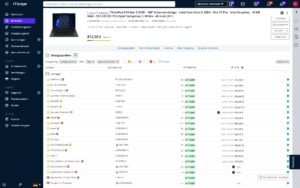
Odoo Interface for ITscope
Transfer titles, images, and data sheets directly into Odoo
Odoo Interface for ITscope
Transfer titles, images, and data sheets directly into Odoo
Use IT products from ITscope directly in Odoo via 7 million
Access more than 7 million million IT products from over 300 distributors in ITscope directly from your Odoo ERP. The interface lets you seamlessly transfer product data such as titles, images, and data sheets into Odoo.
Prices and inventory levels update almost in real time via the API. You can create quotes based on this data and then transfer them directly into Odoo.
Your benefits at a glance
- Access to over 7 million products and 300 distributors directly in your ERP
- Automatic updates for prices, availability, and product data
- Import product details, images, purchase prices, and supplier information
- Custom price calculation for transferring sales prices into Odoo
- Powerful product search (e.g. full text, EAN, SKU, ITscope PUID) with filter options
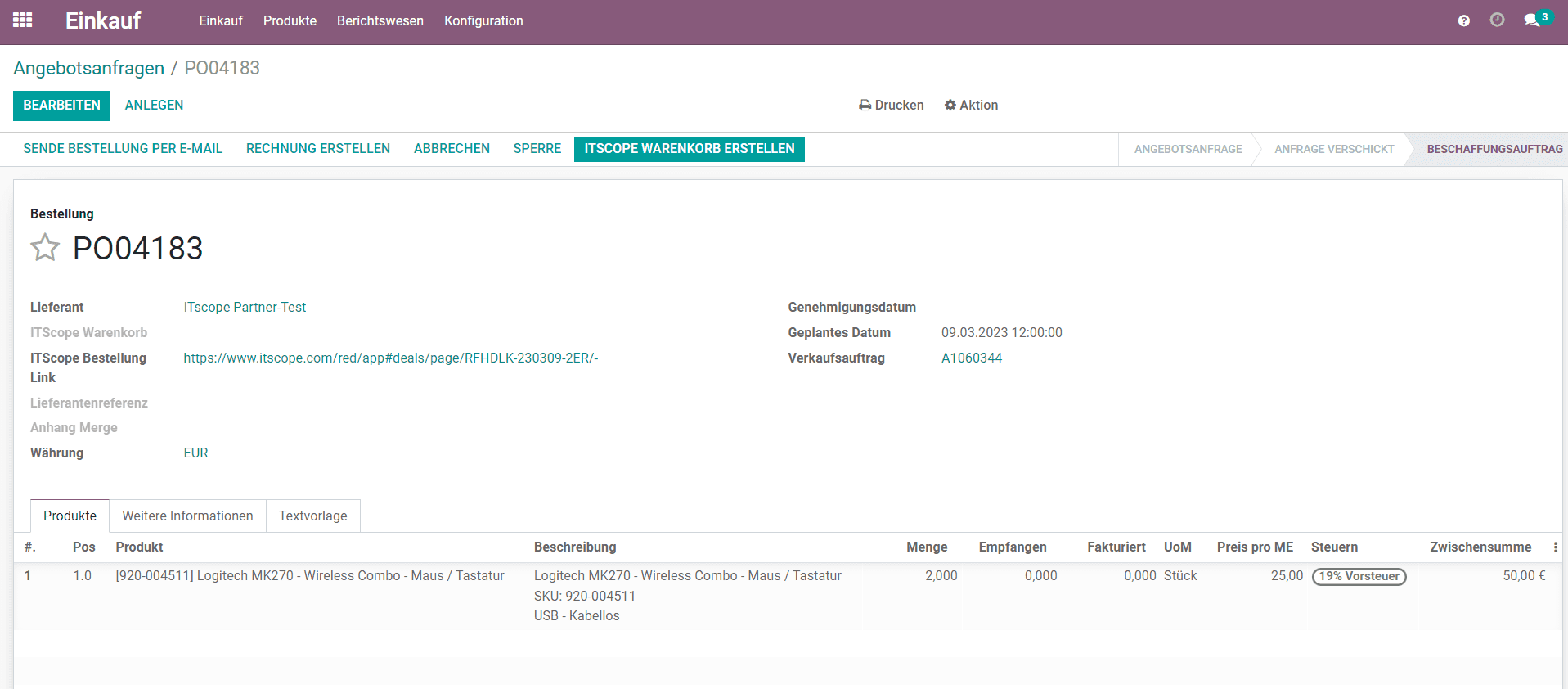
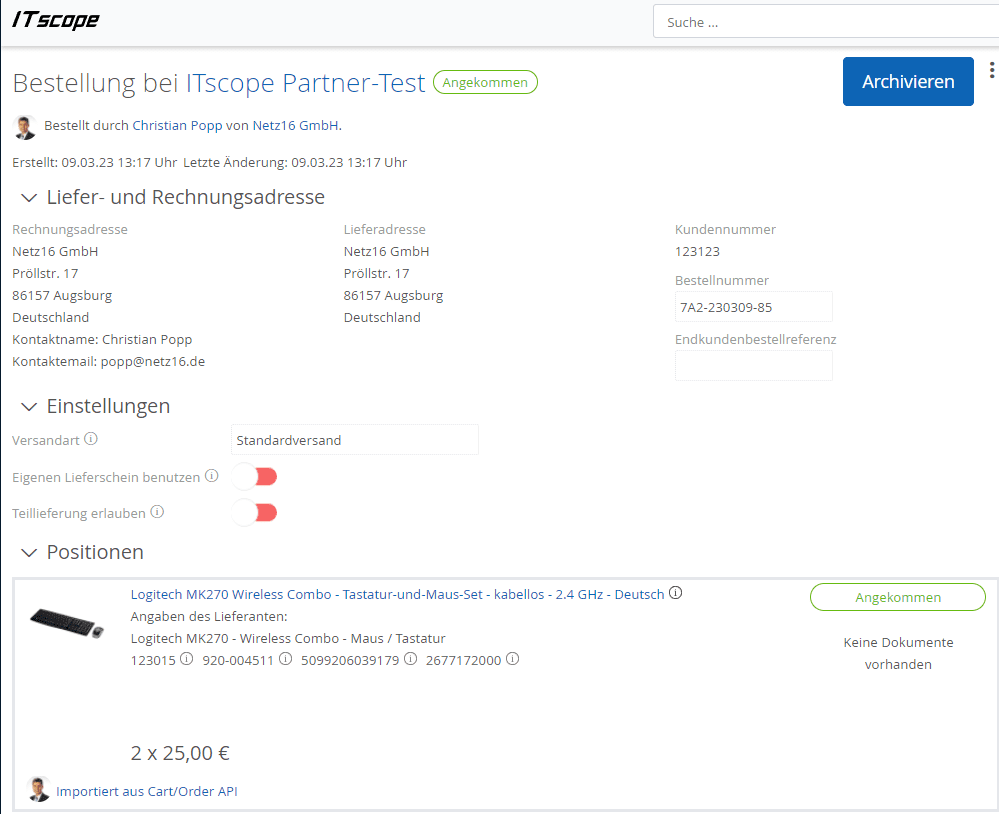
- End-to-end ordering process: place orders from Odoo directly in ITscope and automatically sync them back, including documents
- Use all Odoo features such as logistics, invoicing, and CRM, including after-sales
Requirements for Odoo integrations with ITscope
Odoo version 14, 15, 16, 17, 18, 19
ITscope ERP Integration
Setup only takes a few steps – our support team will be happy to help!
contact@itscope.com
Provider of the Odoo Interface
digisoolut gmbh
Pröllstr. 17
86157 Augsburg
Jörn Steinhauer
+49 (0) 821−50981−0
info@digisoolut.com
Mate IT GmbH
Karlsruher Straße 17
78048 VS-Villingen
Matthias Grdan
+49 (0) 7721 807 8009
team@mateit.de
Features of the Odoo integration
Product search in the ERP
Product creation in the ERP
Transfer of ITscope categories
- Direct insertion of ITscope products into quotes in the ERP
- Datasheets and product images can be easily transferred into the ERP
Sales prices calculated in ITscope are transferred
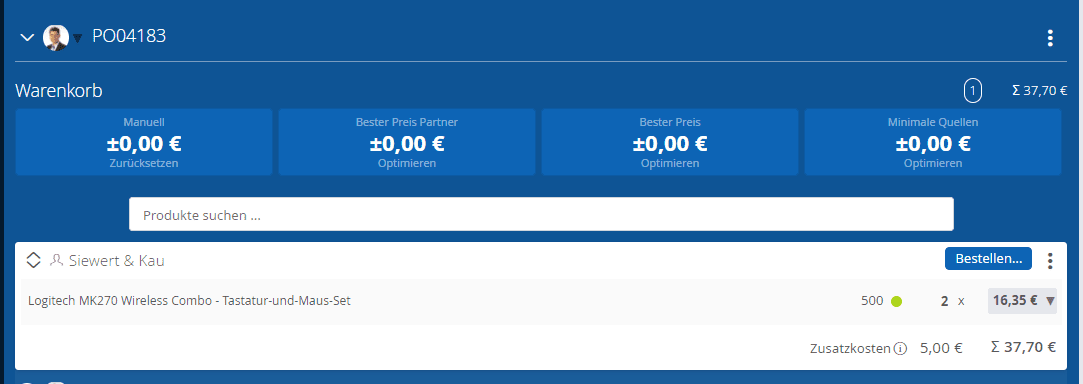
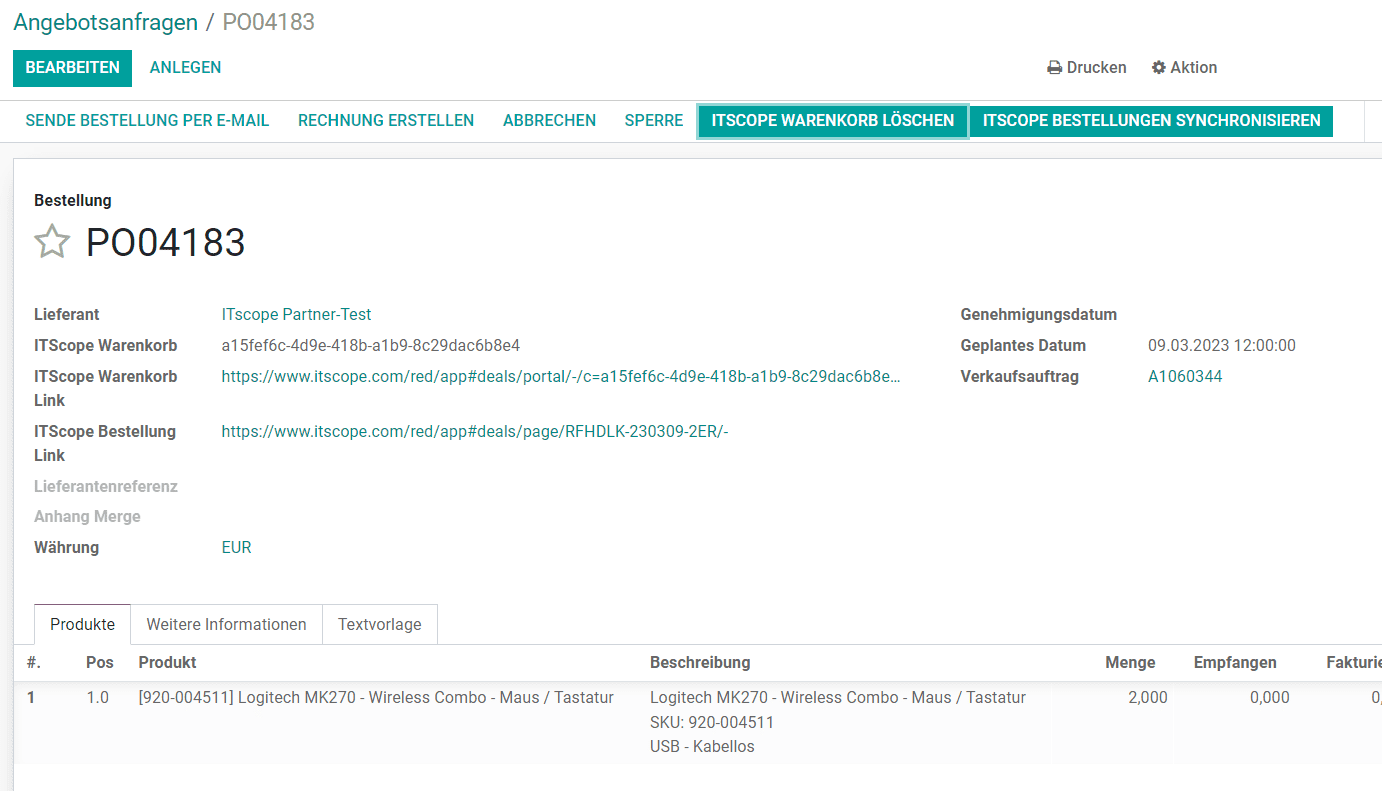
Transfer orders from Odoo to the ITscope cart and optimize them
- Transfer orders from ITscope to the ERP
Synchronization of document records to the ERP
Price comparison for existing quotes (Mate IT only)
Bulk price/inventory updates via API (Mate IT only)
Custom Sales Price Calculation in Odoo (Mate IT only)
Custom Product Names and Categorization When Creating Items in the ERP (Mate IT only)
We’re happy to answer your questions about Odoo and ITscope.
contact@itscope.de
Integration comparison at a glance
Discover a side-by-side comparison of partner interfaces with just one click
| Kategorie |  SAP Business One SAP Business One |  Systemhaus.One Systemhaus.One |  Odoo Odoo |  weclapp weclapp |  DYCE / SITE DYCE / SITE |  Microsoft Dynamics Microsoft Dynamics BC/NAV |  c‑entron c‑entron |  stepsERP stepsERP |  SelectLine SelectLine |  Sage 100 Sage 100 |  JUST.IN JUST.IN |  Concept Office Concept Office | |
|---|---|---|---|---|---|---|---|---|---|---|---|---|---|
| Product search | Product search in ERP system | ✔ | ✔ | ✔ | ✔ | ✔ | ✔ | ✔ | ✔ | ✔ | ✔ | ✔ | ✔ |
| Product search | Price comparison for existing/older offers | ✔ | ✔ | ✔* | |||||||||
| Prices/stock levels | Individual price/stock level update | ✔ | ✔ | ✔ | ✔ | ✔ | ✔ | ✔ | ✔ | ✔ | ✔ | ✔ | ✔ |
| Prices/stock levels | Bulk price/stock level update | ✔* | ✔ | ✔ | ✔ | ✔ | ✔ | ✔ | ✔ | ||||
| Product Creation | Add products from ITscope to ERP system with a click | ✔ | ✔ | ✔ | ✔ | ✔ | ✔ | ✔ | ✔ | ✔ | ✔* | ✔ | |
| Product Creation | Add products in ERP system | ✔ | ✔ | ✔ | ✔ | ✔ | ✔ | ✔ | ✔ | ✔ | ✔ | ✔ | |
| Product Creation | ITscope accessory products can be transferred directly | ✔ | ✔ | ✔ | ✔ | ✔ | ✔ | ||||||
| Quote | Transfer quotes from ITscope with a click (share button) | ✔ | ✔ | ✔ | ✔ | ✔ | ✔ | ✔* | |||||
| Quote | Create quotes in ERP system containing ITscope products | ✔ | ✔ | ✔ | ✔ | ✔ | ✔ | ✔ | ✔ | ✔ | ✔ | ✔ | ✔ |
| Orders | Transfer orders from ITscope to ERP system | ✔ | ✔ | ✔ | ✔ | ✔ | ✔* | ||||||
| Orders | Place orders from the ERP and transmit them via EDI | ✔ | ✔ | ✔ | ✔ | ✔ | ✔ | ✔ | ✔ | ✔ | ✔ | ✔ | |
| Orders | Automatic document transfer (response documents) | ✔ | ✔ | ✔ | ✔ | ✔ | ✔ | ✔ | ✔ | ✔ | ✔ | ✔ | |
| Orders | Order confirmation | ✔ | ✔ | ✔ | ✔ | ✔ | ✔ | ✔ | ✔ | ✔ | ✔ | ✔ | |
| Orders | Delivery note details (serial number) | ✔ | ✔ | ✔ | ✔ | ✔ | ✔ | ✔ | ✔ | ✔ | ✔ | ✔ | |
| Orders | Dispatch confirmation (tracking information) | ✔ | ✔ | ✔ | ✔ | ✔ | ✔ | ✔ | ✔ | ✔ | ✔ | ||
| Orders | Proforma invoice | ✔ | ✔ | ✔ | ✔ | ✔ | ✔ | ✔ | |||||
| Orders | Orders of licence products | ✔ | ✔ | ✔ | ✔ | ✔ | ✔ | ✔ | |||||
| Orders | Own delivery note | ✔ | ✔ | ✔ | ✔ | ✔ | ✔ | ✔ | ✔* | ||||
| Orders | Project orders, special prices | ✔ | ✔ | ✔ | ✔ | ✔ | ✔ | ✔* | ✔ | ✔ | |||
| B2B Shop | Import orders from B2B shop into ERP system | ✔ | ✔ | ✔ | ✔ | ✔ | ✔ | ✔ | |||||
| B2B Shop | Automatic exchange of documents from ERP system into the B2B shop | ✔ | ✔ | ||||||||||
| B2B Shop | Synchronisation of order status from ERP system into ITscope | ✔ | ✔ | ✔ | ✔ | ||||||||
| Datasheets/content | Datasheet as a URL | ✔ | ✔ | ✔ | ✔ | ✔ | ✔ | ✔ | ✔ | ✔ | ✔ | ✔ | |
| Datasheets/content | Long text transfer | ✔ | ✔ | ✔ | ✔ | ✔ | ✔ | ✔ | ✔ | ✔ | |||
| Datasheets/content | Short text transfer | ✔ | ✔ | ✔ | ✔ | ✔ | ✔ | ✔ | ✔ | ✔ | ✔ | ||
| Datasheets/content | Determination of the article standard appearance | ✔ | ✔ | ✔ | ✔ | ✔ | ✔* | ||||||
| Master data update | Master data of each product can be updated with a click | ✔ | ✔ | ✔ | ✔ | ✔ | ✔ | ✔ | ✔ | ✔ | ✔ | ✔ | ✔ |
| Master data update | Master data can be updated via scheduled imports | ✔* | ✔ | ✔ | ✔ | ✔ | ✔* | ✔ | ✔ | ||||
| Master data mapping | Mapping/transfer of manufacturers | ✔ | ✔ | ✔* | ✔ | ✔ | ✔ | ✔ | ✔ | ✔ | ✔ | ||
| Master data mapping | Mapping/transfer of suppliers | ✔ | ✔ | ✔* | ✔ | ✔ | ✔ | ✔ | ✔ | ✔ | ✔ | ||
| Master data mapping | Mapping of categories | ✔ | ✔ | ✔* | ✔ | ✔ | ✔ | ✔ | ✔ | ✔ | ✔ |
| Kategorie | SAP Business One | Systemhaus.One | Odoo | weclapp | DYCE / SITE | Microsoft Dynamics BC/NAV | c‑entron | stepsERP | SelectLine | Sage 100 | JUST.IN | Concept Office | |
|---|---|---|---|---|---|---|---|---|---|---|---|---|---|
| Product search | Product search in ERP system | ✔ | ✔ | ✔ | ✔ | ✔ | ✔ | ✔ | ✔ | ✔ | ✔ | ✔ | ✔ |
| Product search | Price comparison for existing/older offers | ✔ | ✔ | ✔* | |||||||||
| Prices/stock levels | Individual price/stock level update | ✔ | ✔ | ✔ | ✔ | ✔ | ✔ | ✔ | ✔ | ✔ | ✔ | ✔ | ✔ |
| Prices/stock levels | Bulk price/stock level update | ✔* | ✔ | ✔ | ✔ | ✔ | ✔ | ✔ | ✔ | ||||
| Product Creation | Add products from ITscope to ERP system with a click | ✔ | ✔ | ✔ | ✔ | ✔ | ✔ | ✔ | ✔ | ✔ | ✔* | ✔ | |
| Product Creation | Add products in ERP system | ✔ | ✔ | ✔ | ✔ | ✔ | ✔ | ✔ | ✔ | ✔ | ✔ | ✔ | |
| Product Creation | ITscope accessory products can be transferred directly | ✔ | ✔ | ✔ | ✔ | ✔ | ✔ | ||||||
| Quote | Transfer quotes from ITscope with a click (share button) | ✔ | ✔ | ✔ | ✔ | ✔ | ✔ | ✔* | |||||
| Quote | Create quotes in ERP system containing ITscope products | ✔ | ✔ | ✔ | ✔ | ✔ | ✔ | ✔ | ✔ | ✔ | ✔ | ✔ | ✔ |
| Orders | Transfer orders from ITscope to ERP system | ✔ | ✔ | ✔ | ✔ | ✔ | ✔* | ||||||
| Orders | Place orders from the ERP and transmit them via EDI | ✔ | ✔ | ✔ | ✔ | ✔ | ✔ | ✔ | ✔ | ✔ | ✔ | ✔ | |
| Orders | Automatic document transfer (response documents) | ✔ | ✔ | ✔ | ✔ | ✔ | ✔ | ✔ | ✔ | ✔ | ✔ | ✔ | |
| Orders | Order confirmation | ✔ | ✔ | ✔ | ✔ | ✔ | ✔ | ✔ | ✔ | ✔ | ✔ | ✔ | |
| Orders | Delivery note details (serial number) | ✔ | ✔ | ✔ | ✔ | ✔ | ✔ | ✔ | ✔ | ✔ | ✔ | ✔ | |
| Orders | Dispatch confirmation (tracking information) | ✔ | ✔ | ✔ | ✔ | ✔ | ✔ | ✔ | ✔ | ✔ | ✔ | ||
| Orders | Proforma invoice | ✔ | ✔ | ✔ | ✔ | ✔ | ✔ | ✔ | |||||
| Orders | Orders of licence products | ✔ | ✔ | ✔ | ✔ | ✔ | ✔ | ✔ | |||||
| Orders | Own delivery note | ✔ | ✔ | ✔ | ✔ | ✔ | ✔ | ✔ | ✔* | ||||
| Orders | Project orders, special prices | ✔ | ✔ | ✔ | ✔ | ✔ | ✔ | ✔* | ✔ | ✔ | |||
| B2B Shop | Import orders from B2B shop into ERP system | ✔ | ✔ | ✔ | ✔ | ✔ | ✔ | ✔ | |||||
| B2B Shop | Automatic exchange of documents from ERP system into the B2B shop | ✔ | ✔ | ||||||||||
| B2B Shop | Synchronisation of order status from ERP system into ITscope | ✔ | ✔ | ✔ | ✔ | ||||||||
| Datasheets/content | Datasheet as a URL | ✔ | ✔ | ✔ | ✔ | ✔ | ✔ | ✔ | ✔ | ✔ | ✔ | ✔ | |
| Datasheets/content | Long text transfer | ✔ | ✔ | ✔ | ✔ | ✔ | ✔ | ✔ | ✔ | ✔ | |||
| Datasheets/content | Short text transfer | ✔ | ✔ | ✔ | ✔ | ✔ | ✔ | ✔ | ✔ | ✔ | ✔ | ||
| Datasheets/content | Determination of the article standard appearance | ✔ | ✔ | ✔ | ✔ | ✔ | ✔* | ||||||
| Master data update | Master data of each product can be updated with a click | ✔ | ✔ | ✔ | ✔ | ✔ | ✔ | ✔ | ✔ | ✔ | ✔ | ✔ | ✔ |
| Master data update | Master data can be updated via scheduled imports | ✔* | ✔ | ✔ | ✔ | ✔ | ✔* | ✔ | ✔ | ||||
| Master data mapping | Mapping/transfer of manufacturers | ✔ | ✔ | ✔* | ✔ | ✔ | ✔ | ✔ | ✔ | ✔ | ✔ | ||
| Master data mapping | Mapping/transfer of suppliers | ✔ | ✔ | ✔* | ✔ | ✔ | ✔ | ✔ | ✔ | ✔ | ✔ | ||
| Master data mapping | Mapping of categories | ✔ | ✔ | ✔* | ✔ | ✔ | ✔ | ✔ | ✔ | ✔ | ✔ |
| Kategorie | SAP Business One | Systemhaus.One | Odoo | weclapp | DYCE / SITE | Microsoft Dynamics BC/NAV | c‑entron | stepsERP | SelectLine | Sage 100 | JUST.IN | Concept Office | |
|---|---|---|---|---|---|---|---|---|---|---|---|---|---|
| Product search | Product search in ERP system | ✔ | ✔ | ✔ | ✔ | ✔ | ✔ | ✔ | ✔ | ✔ | ✔ | ✔ | ✔ |
| Product search | Price comparison for existing/older offers | ✔ | ✔ | ✔* | |||||||||
| Prices/stock levels | Individual price/stock level update | ✔ | ✔ | ✔ | ✔ | ✔ | ✔ | ✔ | ✔ | ✔ | ✔ | ✔ | ✔ |
| Prices/stock levels | Bulk price/stock level update | ✔* | ✔ | ✔ | ✔ | ✔ | ✔ | ✔ | ✔ | ||||
| Product Creation | Add products from ITscope to ERP system with a click | ✔ | ✔ | ✔ | ✔ | ✔ | ✔ | ✔ | ✔ | ✔ | ✔* | ✔ | |
| Product Creation | Add products in ERP system | ✔ | ✔ | ✔ | ✔ | ✔ | ✔ | ✔ | ✔ | ✔ | ✔ | ✔ | |
| Product Creation | ITscope accessory products can be transferred directly | ✔ | ✔ | ✔ | ✔ | ✔ | ✔ | ||||||
| Quote | Transfer quotes from ITscope with a click (share button) | ✔ | ✔ | ✔ | ✔ | ✔ | ✔ | ✔* | |||||
| Quote | Create quotes in ERP system containing ITscope products | ✔ | ✔ | ✔ | ✔ | ✔ | ✔ | ✔ | ✔ | ✔ | ✔ | ✔ | ✔ |
| Orders | Transfer orders from ITscope to ERP system | ✔ | ✔ | ✔ | ✔ | ✔ | ✔* | ||||||
| Orders | Place orders from the ERP and transmit them via EDI | ✔ | ✔ | ✔ | ✔ | ✔ | ✔ | ✔ | ✔ | ✔ | ✔ | ✔ | |
| Orders | Automatic document transfer (response documents) | ✔ | ✔ | ✔ | ✔ | ✔ | ✔ | ✔ | ✔ | ✔ | ✔ | ✔ | |
| Orders | Order confirmation | ✔ | ✔ | ✔ | ✔ | ✔ | ✔ | ✔ | ✔ | ✔ | ✔ | ✔ | |
| Orders | Delivery note details (serial number) | ✔ | ✔ | ✔ | ✔ | ✔ | ✔ | ✔ | ✔ | ✔ | ✔ | ✔ | |
| Orders | Dispatch confirmation (tracking information) | ✔ | ✔ | ✔ | ✔ | ✔ | ✔ | ✔ | ✔ | ✔ | ✔ | ||
| Orders | Proforma invoice | ✔ | ✔ | ✔ | ✔ | ✔ | ✔ | ✔ | |||||
| Orders | Orders of licence products | ✔ | ✔ | ✔ | ✔ | ✔ | ✔ | ✔ | |||||
| Orders | Own delivery note | ✔ | ✔ | ✔ | ✔ | ✔ | ✔ | ✔ | ✔* | ||||
| Orders | Project orders, special prices | ✔ | ✔ | ✔ | ✔ | ✔ | ✔ | ✔* | ✔ | ✔ | |||
| B2B Shop | Import orders from B2B shop into ERP system | ✔ | ✔ | ✔ | ✔ | ✔ | ✔ | ✔ | |||||
| B2B Shop | Automatic exchange of documents from ERP system into the B2B shop | ✔ | ✔ | ||||||||||
| B2B Shop | Synchronisation of order status from ERP system into ITscope | ✔ | ✔ | ✔ | ✔ | ||||||||
| Datasheets/content | Datasheet as a URL | ✔ | ✔ | ✔ | ✔ | ✔ | ✔ | ✔ | ✔ | ✔ | ✔ | ✔ | |
| Datasheets/content | Long text transfer | ✔ | ✔ | ✔ | ✔ | ✔ | ✔ | ✔ | ✔ | ✔ | |||
| Datasheets/content | Short text transfer | ✔ | ✔ | ✔ | ✔ | ✔ | ✔ | ✔ | ✔ | ✔ | ✔ | ||
| Datasheets/content | Determination of the article standard appearance | ✔ | ✔ | ✔ | ✔ | ✔ | ✔* | ||||||
| Master data update | Master data of each product can be updated with a click | ✔ | ✔ | ✔ | ✔ | ✔ | ✔ | ✔ | ✔ | ✔ | ✔ | ✔ | ✔ |
| Master data update | Master data can be updated via scheduled imports | ✔* | ✔ | ✔ | ✔ | ✔ | ✔* | ✔ | ✔ | ||||
| Master data mapping | Mapping/transfer of manufacturers | ✔ | ✔ | ✔* | ✔ | ✔ | ✔ | ✔ | ✔ | ✔ | ✔ | ||
| Master data mapping | Mapping/transfer of suppliers | ✔ | ✔ | ✔* | ✔ | ✔ | ✔ | ✔ | ✔ | ✔ | ✔ | ||
| Master data mapping | Mapping of categories | ✔ | ✔ | ✔* | ✔ | ✔ | ✔ | ✔ | ✔ | ✔ | ✔ |
| Kategorie | SAP Business One | Systemhaus.One | Odoo | weclapp | DYCE / SITE | Microsoft Dynamics BC/NAV | c‑entron | stepsERP | SelectLine | Sage 100 | JUST.IN | Concept Office | |
|---|---|---|---|---|---|---|---|---|---|---|---|---|---|
| Product search | Product search in ERP system | ✔ | ✔ | ✔ | ✔ | ✔ | ✔ | ✔ | ✔ | ✔ | ✔ | ✔ | ✔ |
| Product search | Price comparison for existing/older offers | ✔ | ✔ | ✔* | |||||||||
| Prices/stock levels | Individual price/stock level update | ✔ | ✔ | ✔ | ✔ | ✔ | ✔ | ✔ | ✔ | ✔ | ✔ | ✔ | ✔ |
| Prices/stock levels | Bulk price/stock level update | ✔* | ✔ | ✔ | ✔ | ✔ | ✔ | ✔ | ✔ | ||||
| Product Creation | Add products from ITscope to ERP system with a click | ✔ | ✔ | ✔ | ✔ | ✔ | ✔ | ✔ | ✔ | ✔ | ✔* | ✔ | |
| Product Creation | Add products in ERP system | ✔ | ✔ | ✔ | ✔ | ✔ | ✔ | ✔ | ✔ | ✔ | ✔ | ✔ | |
| Product Creation | ITscope accessory products can be transferred directly | ✔ | ✔ | ✔ | ✔ | ✔ | ✔ | ||||||
| Quote | Transfer quotes from ITscope with a click (share button) | ✔ | ✔ | ✔ | ✔ | ✔ | ✔ | ✔* | |||||
| Quote | Create quotes in ERP system containing ITscope products | ✔ | ✔ | ✔ | ✔ | ✔ | ✔ | ✔ | ✔ | ✔ | ✔ | ✔ | ✔ |
| Orders | Transfer orders from ITscope to ERP system | ✔ | ✔ | ✔ | ✔ | ✔ | ✔* | ||||||
| Orders | Place orders from the ERP and transmit them via EDI | ✔ | ✔ | ✔ | ✔ | ✔ | ✔ | ✔ | ✔ | ✔ | ✔ | ✔ | |
| Orders | Automatic document transfer (response documents) | ✔ | ✔ | ✔ | ✔ | ✔ | ✔ | ✔ | ✔ | ✔ | ✔ | ✔ | |
| Orders | Order confirmation | ✔ | ✔ | ✔ | ✔ | ✔ | ✔ | ✔ | ✔ | ✔ | ✔ | ✔ | |
| Orders | Delivery note details (serial number) | ✔ | ✔ | ✔ | ✔ | ✔ | ✔ | ✔ | ✔ | ✔ | ✔ | ✔ | |
| Orders | Dispatch confirmation (tracking information) | ✔ | ✔ | ✔ | ✔ | ✔ | ✔ | ✔ | ✔ | ✔ | ✔ | ||
| Orders | Proforma invoice | ✔ | ✔ | ✔ | ✔ | ✔ | ✔ | ✔ | |||||
| Orders | Orders of licence products | ✔ | ✔ | ✔ | ✔ | ✔ | ✔ | ✔ | |||||
| Orders | Own delivery note | ✔ | ✔ | ✔ | ✔ | ✔ | ✔ | ✔ | ✔* | ||||
| Orders | Project orders, special prices | ✔ | ✔ | ✔ | ✔ | ✔ | ✔ | ✔* | ✔ | ✔ | |||
| B2B Shop | Import orders from B2B shop into ERP system | ✔ | ✔ | ✔ | ✔ | ✔ | ✔ | ✔ | |||||
| B2B Shop | Automatic exchange of documents from ERP system into the B2B shop | ✔ | ✔ | ||||||||||
| B2B Shop | Synchronisation of order status from ERP system into ITscope | ✔ | ✔ | ✔ | ✔ | ||||||||
| Datasheets/content | Datasheet as a URL | ✔ | ✔ | ✔ | ✔ | ✔ | ✔ | ✔ | ✔ | ✔ | ✔ | ✔ | |
| Datasheets/content | Long text transfer | ✔ | ✔ | ✔ | ✔ | ✔ | ✔ | ✔ | ✔ | ✔ | |||
| Datasheets/content | Short text transfer | ✔ | ✔ | ✔ | ✔ | ✔ | ✔ | ✔ | ✔ | ✔ | ✔ | ||
| Datasheets/content | Determination of the article standard appearance | ✔ | ✔ | ✔ | ✔ | ✔ | ✔* | ||||||
| Master data update | Master data of each product can be updated with a click | ✔ | ✔ | ✔ | ✔ | ✔ | ✔ | ✔ | ✔ | ✔ | ✔ | ✔ | ✔ |
| Master data update | Master data can be updated via scheduled imports | ✔* | ✔ | ✔ | ✔ | ✔ | ✔* | ✔ | ✔ | ||||
| Master data mapping | Mapping/transfer of manufacturers | ✔ | ✔ | ✔* | ✔ | ✔ | ✔ | ✔ | ✔ | ✔ | ✔ | ||
| Master data mapping | Mapping/transfer of suppliers | ✔ | ✔ | ✔* | ✔ | ✔ | ✔ | ✔ | ✔ | ✔ | ✔ | ||
| Master data mapping | Mapping of categories | ✔ | ✔ | ✔* | ✔ | ✔ | ✔ | ✔ | ✔ | ✔ | ✔ |
| Kategorie | SAP Business One | Systemhaus.One | Odoo | weclapp | DYCE / SITE | Microsoft Dynamics BC/NAV | c‑entron | stepsERP | SelectLine | Sage 100 | JUST.IN | Concept Office | |
|---|---|---|---|---|---|---|---|---|---|---|---|---|---|
| Product search | Product search in ERP system | ✔ | ✔ | ✔ | ✔ | ✔ | ✔ | ✔ | ✔ | ✔ | ✔ | ✔ | ✔ |
| Product search | Price comparison for existing/older offers | ✔ | ✔ | ✔* | |||||||||
| Prices/stock levels | Individual price/stock level update | ✔ | ✔ | ✔ | ✔ | ✔ | ✔ | ✔ | ✔ | ✔ | ✔ | ✔ | ✔ |
| Prices/stock levels | Bulk price/stock level update | ✔* | ✔ | ✔ | ✔ | ✔ | ✔ | ✔ | ✔ | ||||
| Product Creation | Add products from ITscope to ERP system with a click | ✔ | ✔ | ✔ | ✔ | ✔ | ✔ | ✔ | ✔ | ✔ | ✔* | ✔ | |
| Product Creation | Add products in ERP system | ✔ | ✔ | ✔ | ✔ | ✔ | ✔ | ✔ | ✔ | ✔ | ✔ | ✔ | |
| Product Creation | ITscope accessory products can be transferred directly | ✔ | ✔ | ✔ | ✔ | ✔ | ✔ | ||||||
| Quote | Transfer quotes from ITscope with a click (share button) | ✔ | ✔ | ✔ | ✔ | ✔ | ✔ | ✔* | |||||
| Quote | Create quotes in ERP system containing ITscope products | ✔ | ✔ | ✔ | ✔ | ✔ | ✔ | ✔ | ✔ | ✔ | ✔ | ✔ | ✔ |
| Orders | Transfer orders from ITscope to ERP system | ✔ | ✔ | ✔ | ✔ | ✔ | ✔* | ||||||
| Orders | Place orders from the ERP and transmit them via EDI | ✔ | ✔ | ✔ | ✔ | ✔ | ✔ | ✔ | ✔ | ✔ | ✔ | ✔ | |
| Orders | Automatic document transfer (response documents) | ✔ | ✔ | ✔ | ✔ | ✔ | ✔ | ✔ | ✔ | ✔ | ✔ | ✔ | |
| Orders | Order confirmation | ✔ | ✔ | ✔ | ✔ | ✔ | ✔ | ✔ | ✔ | ✔ | ✔ | ✔ | |
| Orders | Delivery note details (serial number) | ✔ | ✔ | ✔ | ✔ | ✔ | ✔ | ✔ | ✔ | ✔ | ✔ | ✔ | |
| Orders | Dispatch confirmation (tracking information) | ✔ | ✔ | ✔ | ✔ | ✔ | ✔ | ✔ | ✔ | ✔ | ✔ | ||
| Orders | Proforma invoice | ✔ | ✔ | ✔ | ✔ | ✔ | ✔ | ✔ | |||||
| Orders | Orders of licence products | ✔ | ✔ | ✔ | ✔ | ✔ | ✔ | ✔ | |||||
| Orders | Own delivery note | ✔ | ✔ | ✔ | ✔ | ✔ | ✔ | ✔ | ✔* | ||||
| Orders | Project orders, special prices | ✔ | ✔ | ✔ | ✔ | ✔ | ✔ | ✔* | ✔ | ✔ | |||
| B2B Shop | Import orders from B2B shop into ERP system | ✔ | ✔ | ✔ | ✔ | ✔ | ✔ | ✔ | |||||
| B2B Shop | Automatic exchange of documents from ERP system into the B2B shop | ✔ | ✔ | ||||||||||
| B2B Shop | Synchronisation of order status from ERP system into ITscope | ✔ | ✔ | ✔ | ✔ | ||||||||
| Datasheets/content | Datasheet as a URL | ✔ | ✔ | ✔ | ✔ | ✔ | ✔ | ✔ | ✔ | ✔ | ✔ | ✔ | |
| Datasheets/content | Long text transfer | ✔ | ✔ | ✔ | ✔ | ✔ | ✔ | ✔ | ✔ | ✔ | |||
| Datasheets/content | Short text transfer | ✔ | ✔ | ✔ | ✔ | ✔ | ✔ | ✔ | ✔ | ✔ | ✔ | ||
| Datasheets/content | Determination of the article standard appearance | ✔ | ✔ | ✔ | ✔ | ✔ | ✔* | ||||||
| Master data update | Master data of each product can be updated with a click | ✔ | ✔ | ✔ | ✔ | ✔ | ✔ | ✔ | ✔ | ✔ | ✔ | ✔ | ✔ |
| Master data update | Master data can be updated via scheduled imports | ✔* | ✔ | ✔ | ✔ | ✔ | ✔* | ✔ | ✔ | ||||
| Master data mapping | Mapping/transfer of manufacturers | ✔ | ✔ | ✔* | ✔ | ✔ | ✔ | ✔ | ✔ | ✔ | ✔ | ||
| Master data mapping | Mapping/transfer of suppliers | ✔ | ✔ | ✔* | ✔ | ✔ | ✔ | ✔ | ✔ | ✔ | ✔ | ||
| Master data mapping | Mapping of categories | ✔ | ✔ | ✔* | ✔ | ✔ | ✔ | ✔ | ✔ | ✔ | ✔ |
| Kategorie | SAP Business One | Systemhaus.One | Odoo | weclapp | DYCE / SITE | Microsoft Dynamics BC/NAV | c‑entron | stepsERP | SelectLine | Sage 100 | JUST.IN | Concept Office | |
|---|---|---|---|---|---|---|---|---|---|---|---|---|---|
| Product search | Product search in ERP system | ✔ | ✔ | ✔ | ✔ | ✔ | ✔ | ✔ | ✔ | ✔ | ✔ | ✔ | ✔ |
| Product search | Price comparison for existing/older offers | ✔ | ✔ | ✔* | |||||||||
| Prices/stock levels | Individual price/stock level update | ✔ | ✔ | ✔ | ✔ | ✔ | ✔ | ✔ | ✔ | ✔ | ✔ | ✔ | ✔ |
| Prices/stock levels | Bulk price/stock level update | ✔* | ✔ | ✔ | ✔ | ✔ | ✔ | ✔ | ✔ | ||||
| Product Creation | Add products from ITscope to ERP system with a click | ✔ | ✔ | ✔ | ✔ | ✔ | ✔ | ✔ | ✔ | ✔ | ✔* | ✔ | |
| Product Creation | Add products in ERP system | ✔ | ✔ | ✔ | ✔ | ✔ | ✔ | ✔ | ✔ | ✔ | ✔ | ✔ | |
| Product Creation | ITscope accessory products can be transferred directly | ✔ | ✔ | ✔ | ✔ | ✔ | ✔ | ||||||
| Quote | Transfer quotes from ITscope with a click (share button) | ✔ | ✔ | ✔ | ✔ | ✔ | ✔ | ✔* | |||||
| Quote | Create quotes in ERP system containing ITscope products | ✔ | ✔ | ✔ | ✔ | ✔ | ✔ | ✔ | ✔ | ✔ | ✔ | ✔ | ✔ |
| Orders | Transfer orders from ITscope to ERP system | ✔ | ✔ | ✔ | ✔ | ✔ | ✔* | ||||||
| Orders | Place orders from the ERP and transmit them via EDI | ✔ | ✔ | ✔ | ✔ | ✔ | ✔ | ✔ | ✔ | ✔ | ✔ | ✔ | |
| Orders | Automatic document transfer (response documents) | ✔ | ✔ | ✔ | ✔ | ✔ | ✔ | ✔ | ✔ | ✔ | ✔ | ✔ | |
| Orders | Order confirmation | ✔ | ✔ | ✔ | ✔ | ✔ | ✔ | ✔ | ✔ | ✔ | ✔ | ✔ | |
| Orders | Delivery note details (serial number) | ✔ | ✔ | ✔ | ✔ | ✔ | ✔ | ✔ | ✔ | ✔ | ✔ | ✔ | |
| Orders | Dispatch confirmation (tracking information) | ✔ | ✔ | ✔ | ✔ | ✔ | ✔ | ✔ | ✔ | ✔ | ✔ | ||
| Orders | Proforma invoice | ✔ | ✔ | ✔ | ✔ | ✔ | ✔ | ✔ | |||||
| Orders | Orders of licence products | ✔ | ✔ | ✔ | ✔ | ✔ | ✔ | ✔ | |||||
| Orders | Own delivery note | ✔ | ✔ | ✔ | ✔ | ✔ | ✔ | ✔ | ✔* | ||||
| Orders | Project orders, special prices | ✔ | ✔ | ✔ | ✔ | ✔ | ✔ | ✔* | ✔ | ✔ | |||
| B2B Shop | Import orders from B2B shop into ERP system | ✔ | ✔ | ✔ | ✔ | ✔ | ✔ | ✔ | |||||
| B2B Shop | Automatic exchange of documents from ERP system into the B2B shop | ✔ | ✔ | ||||||||||
| B2B Shop | Synchronisation of order status from ERP system into ITscope | ✔ | ✔ | ✔ | ✔ | ||||||||
| Datasheets/content | Datasheet as a URL | ✔ | ✔ | ✔ | ✔ | ✔ | ✔ | ✔ | ✔ | ✔ | ✔ | ✔ | |
| Datasheets/content | Long text transfer | ✔ | ✔ | ✔ | ✔ | ✔ | ✔ | ✔ | ✔ | ✔ | |||
| Datasheets/content | Short text transfer | ✔ | ✔ | ✔ | ✔ | ✔ | ✔ | ✔ | ✔ | ✔ | ✔ | ||
| Datasheets/content | Determination of the article standard appearance | ✔ | ✔ | ✔ | ✔ | ✔ | ✔* | ||||||
| Master data update | Master data of each product can be updated with a click | ✔ | ✔ | ✔ | ✔ | ✔ | ✔ | ✔ | ✔ | ✔ | ✔ | ✔ | ✔ |
| Master data update | Master data can be updated via scheduled imports | ✔* | ✔ | ✔ | ✔ | ✔ | ✔* | ✔ | ✔ | ||||
| Master data mapping | Mapping/transfer of manufacturers | ✔ | ✔ | ✔* | ✔ | ✔ | ✔ | ✔ | ✔ | ✔ | ✔ | ||
| Master data mapping | Mapping/transfer of suppliers | ✔ | ✔ | ✔* | ✔ | ✔ | ✔ | ✔ | ✔ | ✔ | ✔ | ||
| Master data mapping | Mapping of categories | ✔ | ✔ | ✔* | ✔ | ✔ | ✔ | ✔ | ✔ | ✔ | ✔ |
| Kategorie | SAP Business One | Systemhaus.One | Odoo | weclapp | DYCE / SITE | Microsoft Dynamics BC/NAV | c‑entron | stepsERP | SelectLine | Sage 100 | JUST.IN | Concept Office | |
|---|---|---|---|---|---|---|---|---|---|---|---|---|---|
| Product search | Product search in ERP system | ✔ | ✔ | ✔ | ✔ | ✔ | ✔ | ✔ | ✔ | ✔ | ✔ | ✔ | ✔ |
| Product search | Price comparison for existing/older offers | ✔ | ✔ | ✔* | |||||||||
| Prices/stock levels | Individual price/stock level update | ✔ | ✔ | ✔ | ✔ | ✔ | ✔ | ✔ | ✔ | ✔ | ✔ | ✔ | ✔ |
| Prices/stock levels | Bulk price/stock level update | ✔* | ✔ | ✔ | ✔ | ✔ | ✔ | ✔ | ✔ | ||||
| Product Creation | Add products from ITscope to ERP system with a click | ✔ | ✔ | ✔ | ✔ | ✔ | ✔ | ✔ | ✔ | ✔ | ✔* | ✔ | |
| Product Creation | Add products in ERP system | ✔ | ✔ | ✔ | ✔ | ✔ | ✔ | ✔ | ✔ | ✔ | ✔ | ✔ | |
| Product Creation | ITscope accessory products can be transferred directly | ✔ | ✔ | ✔ | ✔ | ✔ | ✔ | ||||||
| Quote | Transfer quotes from ITscope with a click (share button) | ✔ | ✔ | ✔ | ✔ | ✔ | ✔ | ✔* | |||||
| Quote | Create quotes in ERP system containing ITscope products | ✔ | ✔ | ✔ | ✔ | ✔ | ✔ | ✔ | ✔ | ✔ | ✔ | ✔ | ✔ |
| Orders | Transfer orders from ITscope to ERP system | ✔ | ✔ | ✔ | ✔ | ✔ | ✔* | ||||||
| Orders | Place orders from the ERP and transmit them via EDI | ✔ | ✔ | ✔ | ✔ | ✔ | ✔ | ✔ | ✔ | ✔ | ✔ | ✔ | |
| Orders | Automatic document transfer (response documents) | ✔ | ✔ | ✔ | ✔ | ✔ | ✔ | ✔ | ✔ | ✔ | ✔ | ✔ | |
| Orders | Order confirmation | ✔ | ✔ | ✔ | ✔ | ✔ | ✔ | ✔ | ✔ | ✔ | ✔ | ✔ | |
| Orders | Delivery note details (serial number) | ✔ | ✔ | ✔ | ✔ | ✔ | ✔ | ✔ | ✔ | ✔ | ✔ | ✔ | |
| Orders | Dispatch confirmation (tracking information) | ✔ | ✔ | ✔ | ✔ | ✔ | ✔ | ✔ | ✔ | ✔ | ✔ | ||
| Orders | Proforma invoice | ✔ | ✔ | ✔ | ✔ | ✔ | ✔ | ✔ | |||||
| Orders | Orders of licence products | ✔ | ✔ | ✔ | ✔ | ✔ | ✔ | ✔ | |||||
| Orders | Own delivery note | ✔ | ✔ | ✔ | ✔ | ✔ | ✔ | ✔ | ✔* | ||||
| Orders | Project orders, special prices | ✔ | ✔ | ✔ | ✔ | ✔ | ✔ | ✔* | ✔ | ✔ | |||
| B2B Shop | Import orders from B2B shop into ERP system | ✔ | ✔ | ✔ | ✔ | ✔ | ✔ | ✔ | |||||
| B2B Shop | Automatic exchange of documents from ERP system into the B2B shop | ✔ | ✔ | ||||||||||
| B2B Shop | Synchronisation of order status from ERP system into ITscope | ✔ | ✔ | ✔ | ✔ | ||||||||
| Datasheets/content | Datasheet as a URL | ✔ | ✔ | ✔ | ✔ | ✔ | ✔ | ✔ | ✔ | ✔ | ✔ | ✔ | |
| Datasheets/content | Long text transfer | ✔ | ✔ | ✔ | ✔ | ✔ | ✔ | ✔ | ✔ | ✔ | |||
| Datasheets/content | Short text transfer | ✔ | ✔ | ✔ | ✔ | ✔ | ✔ | ✔ | ✔ | ✔ | ✔ | ||
| Datasheets/content | Determination of the article standard appearance | ✔ | ✔ | ✔ | ✔ | ✔ | ✔* | ||||||
| Master data update | Master data of each product can be updated with a click | ✔ | ✔ | ✔ | ✔ | ✔ | ✔ | ✔ | ✔ | ✔ | ✔ | ✔ | ✔ |
| Master data update | Master data can be updated via scheduled imports | ✔* | ✔ | ✔ | ✔ | ✔ | ✔* | ✔ | ✔ | ||||
| Master data mapping | Mapping/transfer of manufacturers | ✔ | ✔ | ✔* | ✔ | ✔ | ✔ | ✔ | ✔ | ✔ | ✔ | ||
| Master data mapping | Mapping/transfer of suppliers | ✔ | ✔ | ✔* | ✔ | ✔ | ✔ | ✔ | ✔ | ✔ | ✔ | ||
| Master data mapping | Mapping of categories | ✔ | ✔ | ✔* | ✔ | ✔ | ✔ | ✔ | ✔ | ✔ | ✔ |
| Kategorie | SAP Business One | Systemhaus.One | Odoo | weclapp | DYCE / SITE | Microsoft Dynamics BC/NAV | c‑entron | stepsERP | SelectLine | Sage 100 | JUST.IN | Concept Office | |
|---|---|---|---|---|---|---|---|---|---|---|---|---|---|
| Product search | Product search in ERP system | ✔ | ✔ | ✔ | ✔ | ✔ | ✔ | ✔ | ✔ | ✔ | ✔ | ✔ | ✔ |
| Product search | Price comparison for existing/older offers | ✔ | ✔ | ✔* | |||||||||
| Prices/stock levels | Individual price/stock level update | ✔ | ✔ | ✔ | ✔ | ✔ | ✔ | ✔ | ✔ | ✔ | ✔ | ✔ | ✔ |
| Prices/stock levels | Bulk price/stock level update | ✔* | ✔ | ✔ | ✔ | ✔ | ✔ | ✔ | ✔ | ||||
| Product Creation | Add products from ITscope to ERP system with a click | ✔ | ✔ | ✔ | ✔ | ✔ | ✔ | ✔ | ✔ | ✔ | ✔* | ✔ | |
| Product Creation | Add products in ERP system | ✔ | ✔ | ✔ | ✔ | ✔ | ✔ | ✔ | ✔ | ✔ | ✔ | ✔ | |
| Product Creation | ITscope accessory products can be transferred directly | ✔ | ✔ | ✔ | ✔ | ✔ | ✔ | ||||||
| Quote | Transfer quotes from ITscope with a click (share button) | ✔ | ✔ | ✔ | ✔ | ✔ | ✔ | ✔* | |||||
| Quote | Create quotes in ERP system containing ITscope products | ✔ | ✔ | ✔ | ✔ | ✔ | ✔ | ✔ | ✔ | ✔ | ✔ | ✔ | ✔ |
| Orders | Transfer orders from ITscope to ERP system | ✔ | ✔ | ✔ | ✔ | ✔ | ✔* | ||||||
| Orders | Place orders from the ERP and transmit them via EDI | ✔ | ✔ | ✔ | ✔ | ✔ | ✔ | ✔ | ✔ | ✔ | ✔ | ✔ | |
| Orders | Automatic document transfer (response documents) | ✔ | ✔ | ✔ | ✔ | ✔ | ✔ | ✔ | ✔ | ✔ | ✔ | ✔ | |
| Orders | Order confirmation | ✔ | ✔ | ✔ | ✔ | ✔ | ✔ | ✔ | ✔ | ✔ | ✔ | ✔ | |
| Orders | Delivery note details (serial number) | ✔ | ✔ | ✔ | ✔ | ✔ | ✔ | ✔ | ✔ | ✔ | ✔ | ✔ | |
| Orders | Dispatch confirmation (tracking information) | ✔ | ✔ | ✔ | ✔ | ✔ | ✔ | ✔ | ✔ | ✔ | ✔ | ||
| Orders | Proforma invoice | ✔ | ✔ | ✔ | ✔ | ✔ | ✔ | ✔ | |||||
| Orders | Orders of licence products | ✔ | ✔ | ✔ | ✔ | ✔ | ✔ | ✔ | |||||
| Orders | Own delivery note | ✔ | ✔ | ✔ | ✔ | ✔ | ✔ | ✔ | ✔* | ||||
| Orders | Project orders, special prices | ✔ | ✔ | ✔ | ✔ | ✔ | ✔ | ✔* | ✔ | ✔ | |||
| B2B Shop | Import orders from B2B shop into ERP system | ✔ | ✔ | ✔ | ✔ | ✔ | ✔ | ✔ | |||||
| B2B Shop | Automatic exchange of documents from ERP system into the B2B shop | ✔ | ✔ | ||||||||||
| B2B Shop | Synchronisation of order status from ERP system into ITscope | ✔ | ✔ | ✔ | ✔ | ||||||||
| Datasheets/content | Datasheet as a URL | ✔ | ✔ | ✔ | ✔ | ✔ | ✔ | ✔ | ✔ | ✔ | ✔ | ✔ | |
| Datasheets/content | Long text transfer | ✔ | ✔ | ✔ | ✔ | ✔ | ✔ | ✔ | ✔ | ✔ | |||
| Datasheets/content | Short text transfer | ✔ | ✔ | ✔ | ✔ | ✔ | ✔ | ✔ | ✔ | ✔ | ✔ | ||
| Datasheets/content | Determination of the article standard appearance | ✔ | ✔ | ✔ | ✔ | ✔ | ✔* | ||||||
| Master data update | Master data of each product can be updated with a click | ✔ | ✔ | ✔ | ✔ | ✔ | ✔ | ✔ | ✔ | ✔ | ✔ | ✔ | ✔ |
| Master data update | Master data can be updated via scheduled imports | ✔* | ✔ | ✔ | ✔ | ✔ | ✔* | ✔ | ✔ | ||||
| Master data mapping | Mapping/transfer of manufacturers | ✔ | ✔ | ✔* | ✔ | ✔ | ✔ | ✔ | ✔ | ✔ | ✔ | ||
| Master data mapping | Mapping/transfer of suppliers | ✔ | ✔ | ✔* | ✔ | ✔ | ✔ | ✔ | ✔ | ✔ | ✔ | ||
| Master data mapping | Mapping of categories | ✔ | ✔ | ✔* | ✔ | ✔ | ✔ | ✔ | ✔ | ✔ | ✔ |
| Kategorie | SAP Business One | Systemhaus.One | Odoo | weclapp | DYCE / SITE | Microsoft Dynamics BC/NAV | c‑entron | stepsERP | SelectLine | Sage 100 | JUST.IN | Concept Office | |
|---|---|---|---|---|---|---|---|---|---|---|---|---|---|
| Product search | Product search in ERP system | ✔ | ✔ | ✔ | ✔ | ✔ | ✔ | ✔ | ✔ | ✔ | ✔ | ✔ | ✔ |
| Product search | Price comparison for existing/older offers | ✔ | ✔ | ✔* | |||||||||
| Prices/stock levels | Individual price/stock level update | ✔ | ✔ | ✔ | ✔ | ✔ | ✔ | ✔ | ✔ | ✔ | ✔ | ✔ | ✔ |
| Prices/stock levels | Bulk price/stock level update | ✔* | ✔ | ✔ | ✔ | ✔ | ✔ | ✔ | ✔ | ||||
| Product Creation | Add products from ITscope to ERP system with a click | ✔ | ✔ | ✔ | ✔ | ✔ | ✔ | ✔ | ✔ | ✔ | ✔* | ✔ | |
| Product Creation | Add products in ERP system | ✔ | ✔ | ✔ | ✔ | ✔ | ✔ | ✔ | ✔ | ✔ | ✔ | ✔ | |
| Product Creation | ITscope accessory products can be transferred directly | ✔ | ✔ | ✔ | ✔ | ✔ | ✔ | ||||||
| Quote | Transfer quotes from ITscope with a click (share button) | ✔ | ✔ | ✔ | ✔ | ✔ | ✔ | ✔* | |||||
| Quote | Create quotes in ERP system containing ITscope products | ✔ | ✔ | ✔ | ✔ | ✔ | ✔ | ✔ | ✔ | ✔ | ✔ | ✔ | ✔ |
| Orders | Transfer orders from ITscope to ERP system | ✔ | ✔ | ✔ | ✔ | ✔ | ✔* | ||||||
| Orders | Place orders from the ERP and transmit them via EDI | ✔ | ✔ | ✔ | ✔ | ✔ | ✔ | ✔ | ✔ | ✔ | ✔ | ✔ | |
| Orders | Automatic document transfer (response documents) | ✔ | ✔ | ✔ | ✔ | ✔ | ✔ | ✔ | ✔ | ✔ | ✔ | ✔ | |
| Orders | Order confirmation | ✔ | ✔ | ✔ | ✔ | ✔ | ✔ | ✔ | ✔ | ✔ | ✔ | ✔ | |
| Orders | Delivery note details (serial number) | ✔ | ✔ | ✔ | ✔ | ✔ | ✔ | ✔ | ✔ | ✔ | ✔ | ✔ | |
| Orders | Dispatch confirmation (tracking information) | ✔ | ✔ | ✔ | ✔ | ✔ | ✔ | ✔ | ✔ | ✔ | ✔ | ||
| Orders | Proforma invoice | ✔ | ✔ | ✔ | ✔ | ✔ | ✔ | ✔ | |||||
| Orders | Orders of licence products | ✔ | ✔ | ✔ | ✔ | ✔ | ✔ | ✔ | |||||
| Orders | Own delivery note | ✔ | ✔ | ✔ | ✔ | ✔ | ✔ | ✔ | ✔* | ||||
| Orders | Project orders, special prices | ✔ | ✔ | ✔ | ✔ | ✔ | ✔ | ✔* | ✔ | ✔ | |||
| B2B Shop | Import orders from B2B shop into ERP system | ✔ | ✔ | ✔ | ✔ | ✔ | ✔ | ✔ | |||||
| B2B Shop | Automatic exchange of documents from ERP system into the B2B shop | ✔ | ✔ | ||||||||||
| B2B Shop | Synchronisation of order status from ERP system into ITscope | ✔ | ✔ | ✔ | ✔ | ||||||||
| Datasheets/content | Datasheet as a URL | ✔ | ✔ | ✔ | ✔ | ✔ | ✔ | ✔ | ✔ | ✔ | ✔ | ✔ | |
| Datasheets/content | Long text transfer | ✔ | ✔ | ✔ | ✔ | ✔ | ✔ | ✔ | ✔ | ✔ | |||
| Datasheets/content | Short text transfer | ✔ | ✔ | ✔ | ✔ | ✔ | ✔ | ✔ | ✔ | ✔ | ✔ | ||
| Datasheets/content | Determination of the article standard appearance | ✔ | ✔ | ✔ | ✔ | ✔ | ✔* | ||||||
| Master data update | Master data of each product can be updated with a click | ✔ | ✔ | ✔ | ✔ | ✔ | ✔ | ✔ | ✔ | ✔ | ✔ | ✔ | ✔ |
| Master data update | Master data can be updated via scheduled imports | ✔* | ✔ | ✔ | ✔ | ✔ | ✔* | ✔ | ✔ | ||||
| Master data mapping | Mapping/transfer of manufacturers | ✔ | ✔ | ✔* | ✔ | ✔ | ✔ | ✔ | ✔ | ✔ | ✔ | ||
| Master data mapping | Mapping/transfer of suppliers | ✔ | ✔ | ✔* | ✔ | ✔ | ✔ | ✔ | ✔ | ✔ | ✔ | ||
| Master data mapping | Mapping of categories | ✔ | ✔ | ✔* | ✔ | ✔ | ✔ | ✔ | ✔ | ✔ | ✔ |
* only from select providers